Key takeaways
- Depth before width: Aim for 28–32 inches of depth. Two 27-inch screens on a shallow desk sit roughly 18 inches from your eyes, which forces constant accommodation and contributes to the eye fatigue people mistake for tiredness.
- Eye-level geometry: The top of each screen should land at or slightly below seated eye height. Built-in risers help, but confirm the riser height suits your chair — not the showroom photo.
- Height range, not just “adjustable”: Look for a bottom end near 28 inches. Many electric desks stop at 29–30 inches, which is too tall for shorter users and quietly guarantees shoulder elevation all day.
- Load capacity with headroom: Three monitors, arms, a dock, and a laptop add up fast. Choose a rated capacity of at least 150 lbs so the frame stays rigid and screens don’t wobble during height changes.
- Controllable lighting: Integrated LED strips are genuinely useful for evening work — indirect, warm, dimmable light reduces the contrast between a bright screen and a dark room. Avoid setups where cool-white light is the only option after dark.
What's inside
Most multi-monitor setups are designed as if the workday ends when you stand up. It doesn’t. As a sleep-wellness practitioner, I spend a surprising amount of time talking about desks — because a poorly configured dual- or triple-screen workstation quietly reshapes your evening. Screens sitting too low pull the head forward and load the neck, which shows up hours later as restless tossing. Screens sitting too high push bright light straight into the lower half of your visual field, the region most sensitive to the signals that suppress melatonin. And a cramped surface forces you to work later, longer, and closer than you intended.
This guide looks at desks for two, three, or ultrawide monitor arrangements through that lens: depth (so screens sit at arm’s length, not nose-length), height adjustability (so you can drop into a lower, calmer posture at night), integrated power (so cables don’t dictate where your screens live), and built-in monitor risers that put the top bezel at or just below eye level. Below are the models I’d recommend to a client trying to protect both their spine and their circadian rhythm.
As an Amazon Associate we earn from qualifying purchases.


🛒 Best Price Today on Amazon
Prime members get fast, free shipping on everything above, plus member-only deals. New members get a 30-day free trial — cancel anytime.
How to Choose a Home Office Desk For Multiple Monitors (2026)
- Depth before width: Aim for 28–32 inches of depth. Two 27-inch screens on a shallow desk sit roughly 18 inches from your eyes, which forces constant accommodation and contributes to the eye fatigue people mistake for tiredness.
- Eye-level geometry: The top of each screen should land at or slightly below seated eye height. Built-in risers help, but confirm the riser height suits your chair — not the showroom photo.
- Height range, not just “adjustable”: Look for a bottom end near 28 inches. Many electric desks stop at 29–30 inches, which is too tall for shorter users and quietly guarantees shoulder elevation all day.
- Load capacity with headroom: Three monitors, arms, a dock, and a laptop add up fast. Choose a rated capacity of at least 150 lbs so the frame stays rigid and screens don’t wobble during height changes.
- Controllable lighting: Integrated LED strips are genuinely useful for evening work — indirect, warm, dimmable light reduces the contrast between a bright screen and a dark room. Avoid setups where cool-white light is the only option after dark.
The Best Home Office Desk For Multiple Monitors (2026)s Reviewed
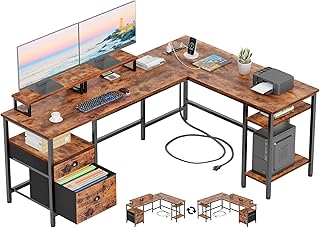
Furologee 66″ L Shaped Desk with Power Outlet
The corner geometry is the real advantage here: two monitors angle inward naturally, so you rotate your eyes rather than your whole torso. Twin monitor stands, a file drawer, and onboard outlets make this the most complete fixed-height option for anyone building a permanent two-screen station.
55″ U Shaped Electric Standing Desk
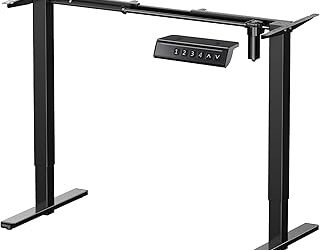
A 28.3-inch minimum height is unusually low and genuinely accommodating for smaller frames, and the three presets let you save distinct seated, standing, and evening positions. The dual-monitor stand plus keyboard tray keeps your wrists neutral while the screens stay high — a combination most standing desks force you to choose between.
Grandder 55×32 Extra-Deep Electric Standing Desk
At 32 inches deep, this is my top pick for anyone running a 49-inch ultrawide or a three-screen array, because the curved edges of a wide panel stay within a comfortable focal distance. Anti-collision sensing and a 176-lb capacity mean a fully loaded setup can travel up and down without drama.
LVB 70.8″ Extra Long Computer Desk
A long, uninterrupted wood top is the simplest solution for triple monitors or a shared two-person workspace, and the industrial metal frame resists the sway that ruins typing on cheaper long desks. You’ll want to add your own monitor arms — plan for that in the budget.
Korfile 59 inch L Shaped Computer Desk
Four adjustable drawers and a reversible orientation make this the most adaptable small-room L-shape on the list, particularly in bedrooms where a tidy desk matters for sleep hygiene. Integrated outlets and dual risers cover the essentials without visual clutter.
Frequently Asked Questions
How wide does a desk need to be for two monitors?
Two 27-inch screens need roughly 48 inches of usable width, and three need 66 inches or more. If you’re near the lower limit, monitor arms recover several inches that stands consume.
Does a standing desk actually help with sleep?
Indirectly. Breaking up prolonged sitting raises daytime energy expenditure and light exposure, both of which strengthen the sleep–wake signal. The desk itself does nothing if you never change position.
Should I put a multi-monitor desk in my bedroom?
If it’s unavoidable, position screens so they face away from the bed and choose a desk with drawers so work disappears at night. Visual reminders of unfinished tasks are a documented contributor to sleep-onset delay.
Do built-in LED lights disrupt melatonin?
Cool, bright, forward-facing light can. Warm settings aimed at the wall behind your monitors are the better evening configuration, and they reduce screen glare at the same time.
Final Thoughts
For ultrawide or triple-screen work, the Grandder 55×32 extra-deep standing desk is the most ergonomically sound choice available this year. The 55″ U-shaped electric desk is the better pick if you need a low seated height and a keyboard tray, while the Furologee 66″ L-shaped desk delivers the most storage and connectivity for a fixed-height corner setup.