Key takeaways
- Height range, not just “adjustable”: Check the lowest and highest numbers against your body. A range like 27.9–46.8 inches suits both shorter users seated and taller users standing; anything starting at 29″+ can leave smaller frames perched with shoulders hunched, which undoes the postural benefit entirely.
- Drawer type versus what you actually stow: Shallow pencil drawers are for stationery and chargers. If you need to file paperwork or hide a laptop, look for a dedicated file drawer or a cabinet-style column. Full-extension runners matter more than drawer count.
- Cable management before you buy: A cable tray, grommet routing, and an onboard power outlet are what let the desk rise without tugging your monitor cord. Retrofitting this is miserable; getting it built in is the single best predictor of long-term satisfaction.
- Lighting you can control: Integrated LED strips are useful if they’re warm and dimmable — cool, bright task light late in the evening suppresses melatonin and pushes your sleep window later. If the desk’s lights are fixed cool-white, plan to leave them off after dusk and use a warm lamp instead.
- Footprint and memory presets: Measure depth carefully; 30 inches gives you proper monitor distance, while 24 inches suits tight rooms. Memory height buttons sound like a gimmick until you realise they’re the difference between standing four times a day and never bothering.
What's inside
Most people shopping for a standing desk are chasing better posture or fewer afternoon slumps. As someone who spends their working life studying rest, I’d argue there’s a bigger prize hiding in plain sight: your nights. Daytime movement and light exposure are two of the strongest levers on sleep pressure and circadian timing we have, and a desk that gets you upright several times a day quietly pulls both. The catch is that a sit-stand desk with no storage forces you to keep everything on the surface — and a cluttered, cable-strewn workstation in a bedroom or spare room keeps the “work” signal switched on long after you’ve logged off. Drawers solve that. Close them, and the room stops being an office.
This guide looks at the best standing desks with built-in drawers for 2026, judged on the things that actually matter after six months of ownership: lift range and motor quality, drawer construction, how well cables are hidden, and whether the desk can genuinely disappear at the end of the day. Below you’ll find our top picks, followed by a buying framework and answers to the questions we get asked most.
As an Amazon Associate we earn from qualifying purchases.




🛒 Best Price Today on Amazon
Prime members get fast, free shipping on everything above, plus member-only deals. New members get a 30-day free trial — cancel anytime.
How to Choose a Standing Desk With Drawers (2026)
- Height range, not just “adjustable”: Check the lowest and highest numbers against your body. A range like 27.9–46.8 inches suits both shorter users seated and taller users standing; anything starting at 29″+ can leave smaller frames perched with shoulders hunched, which undoes the postural benefit entirely.
- Drawer type versus what you actually stow: Shallow pencil drawers are for stationery and chargers. If you need to file paperwork or hide a laptop, look for a dedicated file drawer or a cabinet-style column. Full-extension runners matter more than drawer count.
- Cable management before you buy: A cable tray, grommet routing, and an onboard power outlet are what let the desk rise without tugging your monitor cord. Retrofitting this is miserable; getting it built in is the single best predictor of long-term satisfaction.
- Lighting you can control: Integrated LED strips are useful if they’re warm and dimmable — cool, bright task light late in the evening suppresses melatonin and pushes your sleep window later. If the desk’s lights are fixed cool-white, plan to leave them off after dusk and use a warm lamp instead.
- Footprint and memory presets: Measure depth carefully; 30 inches gives you proper monitor distance, while 24 inches suits tight rooms. Memory height buttons sound like a gimmick until you realise they’re the difference between standing four times a day and never bothering.
The Best Standing Desks With Drawers (2026), Reviewed
AODK 55″ Standing Desk with Drawers & Keyboard Tray
The most complete package here for a single-monitor setup: keyboard tray, monitor riser, power outlet, cable tray, and three memory presets in one rustic-brown unit. The 29.9″–46.1″ range is its one limitation — comfortable for average and taller users, slightly high at the seated end for anyone under about 5’4″.
HUANUO 55 x 30″ Electric Standing Desk with 4 Drawers
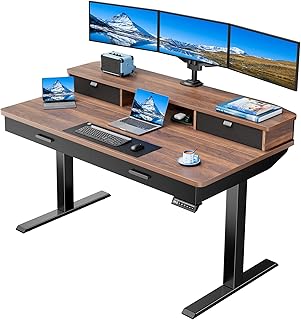
Our pick for people who work with two screens or a laptop-plus-monitor arrangement, thanks to the deeper 30-inch top and reinforced monitor-mount support. The 27.9–46.8 inch travel is the widest on this list, and grommet routing plus a cable tray keep the transition smooth.
59″ Electric Standing Desk with 8 Drawers and Privacy Panel
Effectively a home office in one piece of furniture: eight drawers, a file cabinet, AC and USB, and a fluted privacy panel that hides the mess from the rest of the room. Ideal for a bedroom or open-plan space where the workstation needs to visually shut down at night.
SEDETA 55.1″ Farmhouse Executive Standing Desk
The best-looking option if you want the desk to read as furniture rather than equipment — a white farmhouse finish with three drawers, a storage cabinet, and built-in outlets. A strong choice for shared living spaces where an industrial-looking desk would jar.
63″ L-Shaped Standing Desk with 4 Drawers
For corner installations, the reversible layout lets you configure left- or right-handed and gives you genuine spread-out room for paperwork alongside your screens. It’s the largest commitment here, so confirm your wall measurements before ordering.
Frequently Asked Questions
Do drawers reduce a standing desk’s stability?
Not inherently, but they add weight and shift the centre of gravity. Load heavy files in the lowest drawer, keep the top surface tidy, and avoid raising the desk to full height with drawers open.
How does standing at work affect sleep?
Indirectly but meaningfully. Breaking up sitting increases overall daily movement and light exposure, which strengthens sleep pressure by evening and helps anchor your body clock. It’s not a substitute for exercise or a consistent wake time, but it stacks well with both.
Can I put one of these in my bedroom?
Yes — and drawers plus a privacy panel make it far more viable. The goal is to remove visual work cues before bed, so choose a model where everything can be closed away and keep the desk out of your direct line of sight from the pillow.
Are integrated LED lights worth having?
Useful for daytime task work, less so in the evening unless they dim to a warm tone. Treat them as a bonus feature rather than a deciding factor, and switch to warmer lighting in the two hours before bed.
Final Thoughts
For most home offices, the HUANUO 55 x 30″ is the smartest all-rounder — deep enough for real monitor distance, with the widest height range and proper cable routing. Choose the AODK 55″ if you want a keyboard tray and monitor riser included out of the box, or the 59″ model with eight drawers and a privacy panel if the desk shares a room with your bed and needs to vanish at the end of the day.