Key takeaways
- Compare the best soldering irons for home electronics and DIY, from compact starter kits to digital stations with hot air rework, tips and stands.
A good soldering iron turns fiddly repairs into satisfying ones. Whether you are fixing a loose lamp wire, building a circuit board kit, or repairing a game controller, controlled heat is what makes a clean, lasting joint instead of a cold, brittle one. Basic fixed-temperature pencils are cheap, but they scorch delicate boards, struggle on larger joints, and cannot adapt from thin signal wires to heavier terminals.
This guide focuses on adjustable tools. The best soldering irons for home use let you set a temperature, hold it steady, and recover heat quickly when a joint draws warmth from the tip. Our five picks cover what a homeowner is likely to need: a starter kit for occasional fixes, two proven bench stations, a high-power station kit packed with accessories, and a two-in-one rework station with hot air for surface-mount parts. Every pick comes from a different maker and uses widely available replacement tips.
Disclosure: As an Amazon Associate, I earn from qualifying purchases.
Hakko FX888D Digital Soldering Station

If you want one station to serve a home workshop for years, the Hakko FX888D is the benchmark here. Hakko is a Japanese maker long favored in labs and classrooms, and this digital station pairs a compact blue-and-yellow base with the FX-8801 handpiece. The station consumes 70 watts in total while the iron draws 65 watts through a ceramic heating element, giving it brisk recovery across several joints in a row.
Temperature is set with push buttons, shown on a digital display, and stored in presets you can recall for each job. Stability at idle is tight, and the iron is protected against electrostatic discharge — important on modern boards with sensitive chips. The separate holder includes a cleaning wire and sponge, and the handpiece uses the widely stocked T18 tip family.
Specs
– Brand: Hakko
– Type: Digital station, separate holder
– Power: 70 W station, 65 W iron
– Temperature range: 120–899°F (50–480°C)
– Stability: ±1°C at idle
– Output: 26 V AC
– Dimensions: 3.9×4.7×4.7 in
– Weight: 2.6 lb
– Tips: T18 series, shape-B included
– ASIN: B00ANZRT4M
Weller WE1010NA Digital Soldering Station
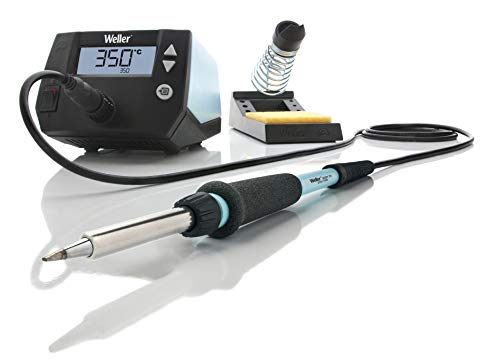
Weller is one of the oldest names in soldering, and the WE1010NA is its digital station for vocational users, serious hobbyists, and home benches. The set combines the WE1 power unit, the WEP 70 iron, and the PH 70 safety rest with a cleaning sponge. The 70-watt iron heats to working temperature in about 28 seconds according to Weller, so you spend less time waiting.
An LCD screen and three push buttons handle temperature setting, and the station adds standby mode, an automatic setback that lowers heat when idle, and password protection for shared garages. The iron is protected against electrostatic discharge, uses a heat-resistant silicone cable, and allows toolless tip changes once cooled. It runs on the ET tip family, another long-running line with many shapes.
Specs
– Brand: Weller
– Type: 1-channel digital station
– Power: 70 W iron, 85 W station
– Temperature range: 200–850°F (100–450°C)
– Heat-up: About 28 seconds to 350°C
– Voltage: 120 V, 60 Hz
– Dimensions: 5.91×4.72×3.86 in
– Weight: About 1.4 kg
– Included: WE1 station, WEP 70 iron, PH 70 rest, ET tip
– ASIN: B077JDGY1J
YIHUA 862BD+ 2-in-1 Soldering and Hot Air Rework Station
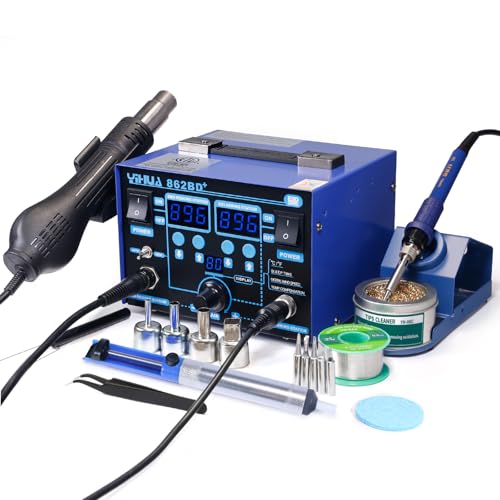
The YIHUA 862BD+ is the pick for projects that go beyond simple joints. It combines a 75-watt soldering iron with a hot air gun in one bench unit, so you can solder through-hole parts with the iron and rework surface-mount chips, shrink tubing, or lift a faulty component with hot air. Dual LED displays show the settings for each tool, and both sides can run independently or together.
The soldering side offers rapid temperature stabilization and a sleep mode you can set from 0 to 99 minutes, so the iron cools in its holder and wakes when picked up. The hot air side uses a brushless fan at up to 120 liters per minute, with automatic cool-down. The kit includes five tips, four nozzles, lead-free solder, a desoldering pump, ESD-safe tweezers, a holder with a brass wool ball, a sponge, and an IC extractor. It is the largest unit here, so measure your bench first.
Specs
– Brand: YIHUA
– Type: 2-in-1 soldering and hot air station
– Soldering power: 75 W
– Soldering range: 392–896°F (200–480°C)
– Hot air range: 212–896°F (100–480°C)
– Total power: 720 W
– Airflow: Up to 120 L/min, brushless fan
– Voltage: 110–127 V AC, 60 Hz
– Dimensions: 6.18×7.32×4.92 in
– Included: 5 tips, 4 nozzles, 35 g lead-free solder, pump, tweezers
– ASIN: B07RY5XWVG
WEP 927-IV Soldering Station Kit
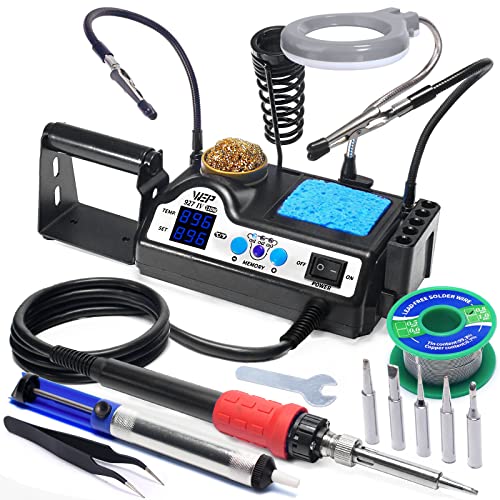
The WEP 927-IV packs a high-power iron and a small workbench of accessories into one compact kit. Its 110-watt heating element is the strongest soldering output in this guide, which helps on larger joints and ground planes that pull heat away quickly. A double numerical display shows both your set temperature and the actual tip temperature, so you know when the iron is ready.
Three preset channels let you save the temperatures you use most — lower for delicate boards, middle for everyday wiring, higher for chunky terminals — and jump between them with a button press. Sleep mode protects the tip during pauses. What sets this kit apart is everything built around the iron: two helping hands, an LED magnifier, a brass wool cleaner with rosin flux, a sponge, a wire dispenser, tip storage slots, five extra tips, lead-free solder, a pump, and tweezers.
Specs
– Brand: WEP
– Type: Station kit with integrated accessories
– Power: 110 W
– Temperature range: 194–896°F (90–480°C)
– Presets: 3 channels
– Display: Double numerical LED
– Voltage: 110 V
– Dimensions: 5.91×3.94×1.89 in
– Weight: 2.25 lb
– Included: 5 extra tips, LED magnifier, helping hands, cleaner, solder, tweezers
– ASIN: B09TXP1KDV
Plusivo Soldering Iron Kit 60W 15-in-1

Not everyone needs a bench station. The Plusivo kit is a simple plug-in iron bundled with the essentials — the natural first tool for occasional repairs, school projects, and learning the basics. The 60-watt iron has a temperature dial on the handle covering 200 to 450 degrees C, a ceramic heating element that warms up quickly, four ventilation holes to shed heat, and a heat-resistant silicone grip.
As a 15-in-1 kit, you get more than the iron: solder wire, two replaceable tips, a simple stand, a desoldering pump for fixing mistakes, tweezers, a mini wire stripper, mini screwdrivers, heatshrink tubes, and hook-up wire, plus a downloadable ebook on technique. That gear matters for beginners — a pump and spare tips turn a bad joint into a quick redo instead of a ruined board. The trade-offs are clear: a dial is less precise than a digital station, and there is no display.
Specs
– Brand: Plusivo
– Type: Plug-in iron kit, 15-in-1
– Power: 60 W
– Temperature range: 392–842°F (200–450°C)
– Voltage: 120 V
– Heating element: Ceramic
– Upper temperature: 450°C
– Dimensions: 10.04×2.76×1.89 in
– Weight: 266 grams
– Included: 2 tips, solder wire, pump, stand, tweezers, stripper, heatshrink tubes
– ASIN: B07XKZVG8Z
How to Choose the Right Soldering Iron
Start with how often you will solder. If you fix one cable a few times a year, a kit iron like the Plusivo is enough. If you solder monthly, a digital station pays off in control and tip life, because steady temperature avoids overheating that eats tips and lifts board pads.
Next, match power and range to your work. Delicate electronics are usually soldered in the middle of the ranges above, while large connectors and ground planes need an iron that pushes heat back into the joint quickly — where 70 watts and above, and the 110-watt WEP, feel different in the hand. A wide range also helps with lead-free solder, which needs a hotter tip.
Then look at control and feedback. A digital display is easier to repeat than a dial, preset channels save time between jobs, and sleep or setback modes extend tip life and make a bench safer. For modern boards, choose a model protected against electrostatic discharge, and consider hot air: only the YIHUA here can rework surface-mount parts without prying.
Finally, check the ecosystem: available tip families, a stable holder, and extras such as a pump and tweezers shape your experience more than headline wattage.
FAQ
What temperature should I use for home electronics?
Beginners do well starting in the middle of the iron’s range and adjusting in small steps. Thin joints need less heat, while large terminals and lead-free solder need more. If solder will not flow, raise the temperature slightly or use a larger tip rather than pressing harder, and if flux burns instantly, lower it.
Do I need a station, or is a simple iron enough?
A simple adjustable iron is enough for occasional wiring and toy repairs. A station is worth it when you solder regularly, work on circuit boards, or want a display, presets, and faster heat recovery. Stations also park the iron in a proper holder, which is safer on a crowded bench.
What is hot air rework, and do I need it?
Hot air rework blows heated air over a component so all of its joints melt at once, letting you remove or fit surface-mount chips cleanly. You only need it for modern boards with surface-mount parts. For through-hole kits, wiring, and connectors, a standard iron covers the job.
How do I make tips last longer?
Keep the tip tinned with a thin coat of solder when you park the iron, clean it on brass wool or a damp sponge instead of sanding it, avoid leaving it at maximum temperature while idle, and use sleep modes when offered. Let the iron cool fully before storing it.
Conclusion
The best soldering irons for a home workshop balance controlled heat, honest temperature feedback, and the right accessories for your jobs. Choose the Hakko FX888D for a proven long-term station, the Weller WE1010NA for fast heat-up and simple controls, the YIHUA 862BD+ when you also need hot air rework, the WEP 927-IV for maximum power plus a complete workstation, or the Plusivo kit for an affordable first tool. Keep a spare tip and a pump nearby, and your repairs will come out cleaner from the first session.
More from Amazon
Programs that pair well with the guide above. Offers and eligibility are set by Amazon and may change.
Collect the home and kitchen items you want in one registry that guests can shop from.
Create a wedding registrySet up recurring deliveries of everyday items on eligible products. Terms and savings are set by Amazon.
Explore Subscribe & SaveFree shipping on eligible items, Prime Video and more. Eligible new members can start with a free trial.
Start a Prime free trialAudiobooks and podcasts to listen to on the go. Eligible new members can start with a free trial.
Try Audible freeAs an Amazon Associate we earn from qualifying purchases.