Key takeaways
- Freestanding, no clamp needed
- Height, tilt, swivel and rotation
- Supports up to 38 inch ultrawide
The best monitor stands under $75 are led by the VIVO Single Monitor Desk Stand, a freestanding VESA stand for screens up to 32 inches that adjusts for height, tilt, swivel and rotation. For storage, the Simple Trending dual stand adds two drawers and USB ports. All six picks are compared from listing specifications and priced within the ceiling.
Quick Comparison
| Model | Key specs (per listing) | Best for |
|---|---|---|
| VIVO Single Monitor Desk Stand | Freestanding, up to 32 inch (38 inch ultrawide), 22 lbs, height, tilt, swivel, rotation | Adjustable freestanding stand |
| VIVO Pneumatic VESA Stand | Freestanding, 17-32 inch, 22 lbs, pneumatic height, rotating base | Smooth height changes |
| Cadcreo Single VESA Stand | For 24-27 inch screens, 7.7-11 lb, one-hand height adjustment, VESA 75/100 | Mid-size monitors |
| Simple Houseware Dual Riser | Dual monitor riser with drawer, phone and tablet slot, side storage | Two screens with storage |
| Simple Trending 2-Tier Dual Stand | 32 by 10 by 7 inch, USB 2.0 and charging, 2 drawers, holds 100 lbs | Ports and heavy load |
| ROCDEER Bamboo Riser with Drawer | Bamboo, drawer, cable management, storage organizer | Natural look |
This tier mixes freestanding VESA stands, which hold a monitor on an adjustable arm, and wide risers with drawers. Every pick is listed within the stated price ceiling and was compared from listing specifications rather than personal use. Weight limits, screen ranges and drawer details come from the listing text; missing figures are marked not listed. Two picks per brand at most, with no used items. The spec lines below stick to what each listing states, which is why some entries give exact dimensions and others only a material and a feature list.
1. VIVO Single Monitor Desk Stand (STAND-V001H)
Listing specs: Freestanding steel base for screens up to 32 inch regular and 38 inch ultrawide, adjustable height, tilt, swivel and rotation, holds 22 lbs, black.
As an Amazon Associate we earn from qualifying purchases at no extra cost to you.
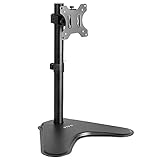
The VIVO V001H is a different kind of stand: a freestanding steel base with an adjustable arm instead of a flat riser. Because it is freestanding, there is no clamp, which suits desks where clamping is awkward, such as glass or thin edges. The listing states support for up to 32 inch regular and 38 inch ultrawide screens, with a 22 lb limit, plus height, tilt, swivel and rotation adjustment. The steel base takes up desk space, which a clamp arm does not, and it needs a monitor with VESA mounting holes, so check the back of your screen before buying. If you want an adjustable screen without drilling or clamping, this is the model to start with.
Pros
- Freestanding, no clamp needed
- Height, tilt, swivel and rotation
- Supports up to 38 inch ultrawide
Cons
- Base uses desk space
- Needs VESA mounting holes on the monitor
2. VIVO Single VESA Monitor and Touch Screen Desk Stand (STAND-V001R)
Listing specs: Freestanding stand for 17 to 32 inch screens, holds 22 lbs, rotating base, pneumatic height-adjustable arm, 12 inch maximum screen height, black.

This VIVO is the more refined freestanding option, and the more advanced of the two VIVO stands. The listing mentions a pneumatic arm for height changes and a rotating base, plus a maximum screen height of 12 inches above the desk. It handles 17 to 32 inch screens up to 22 lbs, and the touch-screen wording suggests the arm can be positioned more flexibly for point-of-sale or display use. Pneumatic adjustment makes the screen easier to raise and lower than a friction-based arm. The trade-off is the same as the V001H: a freestanding base that takes desk space. Pick this over the V001H if you change screen height often.
Pros
- Pneumatic height adjustment
- Rotating base
- 17-32 inch screen range
Cons
- Base takes desk space
- Larger footprint than a clamp arm
3. Cadcreo Single VESA Monitor Stand
Listing specs: Single VESA stand for 24-27 inch monitors weighing 7.7-11 lb, one-hand height adjustment, swivel and tilt, VESA 75×75 and 100×100.

The Cadcreo is aimed squarely at mid-size monitors: 24 to 27 inches, weighing 7.7 to 11 lb. The listing specifically asks buyers to confirm monitor weight, which is good advice because arms like this work within a limited weight band. One-hand height adjustment, swivel and tilt make it easy to change the setup, and VESA 75 and 100 mm cover most screens. It is not intended for heavy or very large displays, so check weight before you commit. If your monitor sits inside that weight band, it is a clean, simple stand.
Pros
- One-hand height adjustment
- VESA 75 and 100 support
- Clear weight range stated
Cons
- Narrow weight range
- Not for large or heavy monitors
4. Simple Houseware Desk Dual Monitor Stand Riser
Listing specs: Dual monitor stand riser with drawer, rustic brown, customizable organizer tray, built-in phone and tablet slot, side storage.

This stand is wide enough for two screens or a laptop and a monitor, and it adds a drawer, a phone and tablet slot and side storage. The listing mentions a customizable organizer tray, which lets you rearrange the compartments. It is a flat riser, not an arm, so screens sit directly on top at a fixed height, and it does not state a weight rating in the compared text. The rustic brown finish gives it a woodsy desk look. It is a good match for people who want to organize a dual setup and do not need height adjustment.
Pros
- Wide enough for dual screens
- Phone and tablet slot
- Customizable organizer tray
Cons
- Fixed height
- Weight rating not listed
5. Simple Trending 2-Tier Metal Dual Monitor Stand
Listing specs: 32 inch wide, 10 inch deep, 7 inch high metal stand, USB 2.0 plus charging port, 2 drawers, mesh cooling vents, holds 100 lbs, non-slip base, cable ties included.

This is the most fully specified stand in the tier. The listing gives dimensions of 32 by 10 by 7 inches, a 100 lb load rating, two drawers, mesh cooling vents, a USB 2.0 port and a charging port, plus a non-slip base and cable ties. That makes it the strongest option for a dual-monitor desk that needs extra USB ports and a high weight rating. The 7 inch height is a modest lift, enough to clear a keyboard but not to put a screen at eye level for a tall user. Fixed height is the main limit.
Pros
- 100 lb rating
- Two drawers and USB ports
- Metal with mesh vents
Cons
- Fixed 7 inch height
- 32 inch width needs desk space
6. ROCDEER Bamboo Monitor Stand Riser with Drawer
Listing specs: Bamboo monitor stand riser with drawer, ergonomic computer riser with cable management and storage organizer.

ROCDEER is the natural-material choice, a bamboo riser with a drawer and cable management. Bamboo suits home offices where metal and plastic feel cold, and the cable management feature helps tidy loose cords behind the screen. The listing does not state a load rating, size or height in the compared text, so check the maker page before putting a heavy monitor on it. It is better suited to a laptop or a mid-size monitor on a clean desk. If you want a tidy, warm-looking workspace and your screen is light, it fits well.
Pros
- Bamboo finish
- Drawer and cable management
- Tidy look
Cons
- Load rating not listed
- Size not listed
Monitor Stands for Home Office, Small Spaces and Gaming
Monitor stands for home office
A freestanding VESA stand like the VIVO models puts the screen at the right height without clamping the desk, while a riser with a drawer organizes pens and chargers. For long workdays, choose adjustable height so the top of the screen lands near eye level. Add a separate keyboard shelf or a tidy cable run if the desk is shared.
Monitor stands for small spaces
A dual riser takes a lot of width, so measure first. On a narrow desk, a single VESA stand or the ROCDEER riser takes less space. Storage drawers on the riser help keep small items off the desk surface.
Monitor stands for gaming
Gaming monitors are often heavier than the stated weight limits of simple stands. The Simple Trending lists 100 lbs and the VIVO stands list 22 lbs, so match them to your screen. The USB ports on the Simple Trending are handy for headsets and controllers.
How to Choose Under $75
Decide between VESA stand and riser
A VESA stand holds the monitor on an arm and adjusts for height, tilt and swivel, but needs VESA holes on the back. A riser lifts the whole monitor with its own base and needs no holes.
Match weight and size to your screen
Check the weight of your monitor without its stand. The Cadcreo covers 7.7-11 lb, the VIVO stands go to 22 lbs, and the Simple Trending lists 100 lbs for a dual shelf.
Choose ports and storage
If you need extra USB ports for peripherals, the Simple Trending is the one that lists them. Drawer risers help organize pens and chargers.
Plan the footprint
Freestanding bases and wide risers use desk space. Measure your desk depth to leave room for a keyboard, and decide whether you need one screen or two.
Height and ergonomics
The top edge of the screen should sit around eye level when you look straight ahead. A VESA stand lets you set that precisely. A fixed riser adds a set amount of lift, so check it against your chair and desk height. Tall users often need more lift than a 7 inch riser provides, while short users may find a riser puts the screen too high.
Cable tidiness
Stands with cable management or cable ties, such as the ROCDEER and the Simple Trending, help keep the power and video cables out of sight. A tidy cable run also stops cables pulling the monitor when you move it, which matters most on lighter freestanding stands.
FAQ
What is the best monitor stand for a home office?
The VIVO V001H suits most home offices because it adjusts for height, tilt, swivel and rotation without clamping to the desk. It supports screens up to 32 inches.
Do I need VESA holes for these stands?
The VIVO and Cadcreo stands do, using VESA 75 or 100 mm. The riser-style stands from Simple Houseware, Simple Trending and ROCDEER do not.
Which stand is best for dual monitors?
The Simple Trending 2-Tier lists a 100 lb rating, two drawers and USB ports for dual screens, making it the most complete choice here.
Are these stands good for small spaces?
Single VESA stands and the ROCDEER riser take less width than the dual risers. Measure your desk before you pick a wide dual stand.
Can these stands hold a gaming monitor?
The VIVO stands list a 22 lb limit, which suits many gaming screens up to 32 inches, and the Simple Trending riser lists 100 lbs. Confirm your monitor weight and VESA pattern before choosing.
Last updated: November 2026
More from Amazon
Programs that pair well with the guide above. Offers and eligibility are set by Amazon and may change.
Collect the home and kitchen items you want in one registry that guests can shop from.
Create a wedding registrySet up recurring deliveries of everyday items on eligible products. Terms and savings are set by Amazon.
Explore Subscribe & SaveFree shipping on eligible items, Prime Video and more. Eligible new members can start with a free trial.
Start a Prime free trialAudiobooks and podcasts to listen to on the go. Eligible new members can start with a free trial.
Try Audible freeAs an Amazon Associate we earn from qualifying purchases.