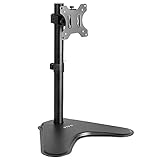
Key takeaways
- Holds up to 44 lbs and 49 inch screens
- Spring-assisted height changes
- Quick-release plate
The best monitor arms under $150 are led by the MSI MAG MT201, a spring-assisted single arm that holds 17-49 inch screens up to 44 lbs. For two screens, the ErgoFocus dual gas-spring mount handles up to 43 inch panels. All six picks are compared from listing specifications and listed at or under this ceiling.
Quick Comparison
| Model | Key specs (per listing) | Best for |
|---|---|---|
| MSI MAG MT201 | Single arm, 17-49 inch screens, 44 lbs, spring assisted, VESA | Ultrawide and heavy screens |
| WALI Heavy Duty Arm GSM001XL | Single arm, 13-49 inch curved screens, 44 lbs, VESA 75/100 | Curved ultrawides |
| VIVO Aluminum Ultrawide Tension Arm | Single arm, up to 49 inches, 44 lbs, aluminum, VESA 100×100 | Samsung Odyssey-class ultrawides |
| ARES WING Ultrawide Arm | Single arm, 17-49 inches, 44 lbs, pro gas spring, VESA 75/100 | Easy height adjustment |
| ErgoFocus Dual Monitor Mount | Dual arm, screens up to 43 inches, 2.2-33 lbs each, gas spring | Two screens |
| HUANUO TitanLift | Single arm, up to 49 inches, 44 lbs, aluminum, dual C-clamp, VESA 100×100 | Strong aluminum arm |
Arms at this level are mostly heavy-duty, ultrawide-capable models. Every pick is listed within the stated price ceiling and was compared from listing specifications rather than personal use. Weight capacity, screen range and VESA support come from the listing text; anything not stated is marked as not listed. At most two picks per brand, and wall mounts and used listings were left out.
1. MSI MAG MT201 Heavy Duty Single Monitor Arm
Listing specs: Premium heavy-duty single arm, supports 17-49 inch screens and 44 lbs, VESA compatible, spring-assisted adjustment, clamp and grommet mounting, quick-release plate.
As an Amazon Associate we earn from qualifying purchases at no extra cost to you.

The MT201 covers the weight and size range that people with large ultrawide gaming monitors actually need: up to 49 inches and 44 lbs. The listing describes spring-assisted movement, which lets you shift the screen height with one hand rather than loosening a bolt, and a quick-release plate that makes mounting a heavy screen easier because you attach the bracket first and then hang the monitor. Clamp and grommet options cover most desks. It is a single arm, so it does not replace a dual setup. Check the monitor VESA pattern on the maker page, as the listing states compatibility but does not detail every pattern. If you need one arm to carry a big screen without sagging, this is where the tier starts.
Pros
- Holds up to 44 lbs and 49 inch screens
- Spring-assisted height changes
- Quick-release plate
Cons
- Single monitor only
- VESA patterns not fully detailed in listing text
2. WALI Heavy Duty Monitor Arm (GSM001XL)
Listing specs: Single arm for 13-49 inch screens including 1000R curved, up to 44 lbs, full motion with tilt, swivel and rotation, C-clamp or grommet base, VESA 75 and 100 mm.

WALI lists this arm for a very broad range of screens, from 13 inches up to 49 inch curved ultrawides, with a 44 lb capacity. Full motion means tilt, swivel and rotation, so you can flip a screen to portrait or pull it toward you. Mounting is by C-clamp or grommet, covering most desk edges. VESA 75 and 100 mm cover the large majority of monitors. Because it is built to carry heavy panels, the arm itself is chunkier than a small light-duty mount, so a thin desk edge needs checking against the clamp range on the maker page. The listing does not mention gas spring, so expect a manual tension adjustment, which is fine once set but less convenient if you change screens often.
Pros
- 13-49 inch range with 44 lb capacity
- Full motion with rotation
- Clamp or grommet mounting
Cons
- Larger arm body
- Gas spring not mentioned in listing
3. VIVO Aluminum Ultrawide Monitor Tension Arm (STAND-V101V)
Listing specs: Aluminum single arm, up to 49 inch screens, holds 44 lbs, heavy duty premium desk mount, max VESA 100×100, designed for Samsung Odyssey G9 and similar.
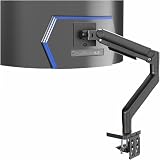
The VIVO tension arm is built around the weight of the biggest gaming monitors, and the listing names the Samsung Odyssey G9 as a target. Aluminum construction keeps the arm lighter than an all-steel design at the same 44 lb rating, and the tension mechanism lets you adjust the height without a tool once it is set to your screen. The maximum VESA pattern is 100×100, so a monitor that needs a larger pattern would not fit. Because it is aimed at large ultrawides, it is more arm than a small 24 inch screen needs. For anyone with a G9-style monitor on a deep desk, it is a sensible match.
Pros
- Aluminum body with 44 lb rating
- Aimed at 49 inch super-ultrawides
- Tension adjustment
Cons
- Max VESA 100×100 only
- Overbuilt for small monitors
4. ARES WING Ultrawide Monitor Desk Arm
Listing specs: Single arm for 17-49 inch screens, holds 44 lbs, pro gas spring, full range of motion, VESA 75 and 100, C clamp and grommet base, for curved and flat monitors.

ARES WING advertises a pro gas spring, which gives the smooth, near-floating height adjustment that people expect from premium arms. It holds up to 44 lbs on 17-49 inch screens and works with VESA 75 and 100. Both a C clamp and a grommet base are included in the listing. The brand name is less familiar than MSI or VIVO, so checking the maker page for support and warranty terms is a good idea. If you move your screen up and down often, perhaps between sitting and standing, a gas spring design is more pleasant than a tension arm. The listing does not state a maximum extension distance, so measure your desk depth before ordering.
Pros
- Gas spring for easy adjustment
- 44 lb capacity
- Clamp and grommet bases
Cons
- Less established brand
- Extension reach not listed
5. ErgoFocus Dual Monitor Mount
Listing specs: Dual heavy-duty gas spring arm for two screens up to 43 inches, holds 2.2-33 lbs each, ultrawide capable, VESA mount.

This is the pick for people who want two screens on one clamp. The listing gives a weight range of 2.2 to 33 lbs per screen, which is generous enough for two large monitors, and it mentions support for screens up to 43 inches. Gas spring arms let each screen float to the height you like. The wide per-screen capacity makes it a strong match for a gaming plus work setup with heavier panels. With two big monitors the clamp has to carry a lot of leverage, so make sure your desk is thick and stiff enough, and confirm the clamp range on the maker page. A dual mount also needs only one clamp point on the desk instead of two.
Pros
- Dual setup on one clamp
- Up to 33 lbs per screen
- Gas spring adjustment
Cons
- Needs a sturdy desk edge
- Less brand recognition
6. HUANUO TitanLift Heavy Duty Monitor Arm
Listing specs: Aluminum single arm for screens up to 49 inches, holds 44 lbs, fully adjustable gaming mount, dual C-clamp, max VESA 100×100.

The TitanLift is HUANUO’s top single arm and sits near the ceiling of this list. It lists a 44 lb rating, aluminum construction and a dual C-clamp, which spreads the clamp load across two points for extra security on heavy screens. The fully adjustable design suits a gaming desk, and the aluminum body helps keep the arm light. As with the VIVO, maximum VESA is 100×100. At the top of the price range it competes with arms that carry stronger brand names, so it makes most sense if the dual clamp and the aluminum build matter to you. Otherwise, the MSI and WALI arms cover similar ground with a simpler single clamp.
Pros
- Aluminum build
- Dual C-clamp for stability
- 44 lb capacity
Cons
- Top of the price range
- Max VESA 100×100
Monitor Arms for Home Office, Small Spaces and Gaming
Monitor arms for home office
A single arm with gas spring or tension adjustment, such as the MSI MT201 or ARES WING, makes it easy to switch between sitting and standing. For multi-window work, the ErgoFocus dual mount gives two screens on one clamp, freeing the desk surface for documents and a keyboard.
Monitor arms for small spaces
Arms lift the monitor off the desk and give back the space under it. A single arm on a small desk lets you slide the screen toward the wall when you are not using it. Dual mounts need more desk depth and a thicker edge, so measure first.
Monitor arms for gaming
Gaming monitors are often large and heavy. The 44 lb, 49 inch ratings on the MSI, WALI, VIVO, ARES WING and HUANUO arms exist for this reason. Confirm the monitor VESA pattern is 75 or 100, and weigh the screen with its stand removed, not as shipped.
How to Choose Under $150
Match capacity to your screen
Look up the weight of your monitor without its stand and choose an arm rated at least 20 percent above it. For 34-49 inch ultrawides, choose a 44 lb rated arm so the spring or tension range sits in the middle of its adjustment.
Check VESA and desk requirements
Most listed arms use 75×75 or 100×100 mm VESA. Desk edge thickness for the clamp, and whether the desk top is solid or hollow, matter more than most buyers expect.
Gas spring versus tension
Gas spring arms move with a light touch and suit users who adjust often. Tension or manual arms are simpler and cost less. Both work well once set.
Single or dual
A single arm is easier to mount and place. A dual arm saves desk space but needs a stronger desk and more depth.
Reach and cable routing
Check the listed arm reach against your desk depth, since a long arm on a shallow desk leaves the screen hanging off the back. Look for cable clips on the arm body and plan to leave a little slack so the cables do not pull the screen when it moves.
FAQ
What is the best monitor arm for a home office?
The MSI MAG MT201 is a strong all-rounder with its 44 lb rating and spring assist. For two screens, choose the ErgoFocus dual mount.
Can a monitor arm hold a 49 inch ultrawide?
Several listed arms are rated for 49 inch screens and 44 lbs, including MSI, WALI, VIVO, ARES WING and HUANUO. Check your monitor weight and VESA pattern first.
Are monitor arms good for small spaces?
Yes, they free the desk surface by lifting the screen. Choose a single arm for tight desks and verify the clamp fits your desk edge.
Do I need gas spring for a gaming monitor?
Not required. Gas springs make height changes easier, but a tension arm holds a gaming monitor just as well once set up.
How do I know if my monitor fits an arm?
Check the VESA hole pattern on the back, usually 75×75 or 100×100 mm, and the screen weight without its stand. Both must be within the arm listing.
Last updated: November 2026
More from Amazon
Programs that pair well with the guide above. Offers and eligibility are set by Amazon and may change.
Collect the home and kitchen items you want in one registry that guests can shop from.
Create a wedding registrySet up recurring deliveries of everyday items on eligible products. Terms and savings are set by Amazon.
Explore Subscribe & SaveFree shipping on eligible items, Prime Video and more. Eligible new members can start with a free trial.
Start a Prime free trialAudiobooks and podcasts to listen to on the go. Eligible new members can start with a free trial.
Try Audible freeAs an Amazon Associate we earn from qualifying purchases.