Key takeaways
- Pro: Full-motion adjustment
- Pro: Fits 13 to 32 inch screens
- Pro: Designed with gaming desks in mind
- Con: Weight per arm not in the listing title
- Con: Sits near the top of this price tier
The best dual monitor arms under $75 start with the HUANUO FlowLift for full-motion adjustment, the WALI Adjustable Dual Monitor Arm for 22 lbs per arm, and the Mount-It! gas spring model for independent arms. All six are compared from listing specifications: screen range, weight per arm, VESA pattern and arm type.
A dual monitor arm lifts two screens off the desk so you can set height, tilt and distance separately, and it frees the footprint the stand legs used to take. At this budget ceiling you will see two designs: gas spring arms that float with a light push, and mechanical or fixed-tension arms that hold position by friction. The numbers that decide fit are screen size range, weight per arm, VESA pattern and clamp type. Home office, small-space and gaming use are covered in the picks and the FAQ below.
Because we did not use these products ourselves, every claim below traces back to listing text rather than personal experience. Treat the shortlist as a starting point and confirm the clamp thickness, VESA pattern and weight range against your own monitors on the maker page. Monitor arms fail in boring ways: a screen that is too heavy sags, a desk that is too thin cracks at the clamp, and a curved ultrawide may not fit a bracket meant for 32 inches or less.
Quick Comparison
| Model | Key specs per listing | Best for |
|---|---|---|
| HUANUO FlowLift Dual Monitor Stand | 13 to 32 inch screens, full motion, gaming-oriented desk mount | Gaming and full-motion setups |
| WALI Adjustable Dual Monitor Arm | 13 to 32 inch screens, 22 lbs per arm, full motion | General home office use |
| VIVO AeroPoise Dual Monitor Stand | 17 to 32 inch screens, up to 19.8 lbs, mechanical articulation | Lighter monitors |
| Acer Dual Monitor Arm | Gas spring, 17 to 32 inch screens, VESA 75×75 and 100×100 | Smooth height changes |
| Mount-It! Dual Monitor Desk Mount | 13 to 32 inch screens, 17.6 lbs each, two independent gas spring arms | Independent arm movement |
| ErGear Dual Monitor Stand | Up to 33 inch screens, max 22 lbs per arm, adjustable mount | Larger screens within weight limit |
Weight per arm is the number to check first. Four of the six list a limit between 17.6 and 22 lbs, and the other two leave the per-arm figure for the maker page, so weigh your monitor before you shop. Flat-panel 24 to 27 inch screens usually fall inside those limits, but a heavy 32 inch panel may sit close to the ceiling. A gas spring pick is the better match when you plan to move screens often.
HUANUO FlowLift Dual Monitor Stand
As an Amazon Associate we earn from qualifying purchases at no extra cost to you.
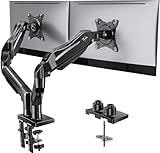
Spec line: Fully adjustable desk mount for 13 to 32 inch screens, full motion; the listing positions it as a gaming monitor mount.
The FlowLift is the pick for people who rearrange their screens often, because full motion means tilt, swivel and rotation on each arm. The listing aims it at gaming desks, which usually means two side-by-side displays or one main screen with a second for chat and streaming tools. Compared with the cheaper picks, it is positioned at the higher end of this price tier, and the trade for that is that the weight per arm and VESA pattern are not stated in the title we compared. Check both on the maker page, especially if you plan to mount a heavier 32 inch display. Clamp or grommet details are also worth confirming for a thin desktop.
- Pro: Full-motion adjustment
- Pro: Fits 13 to 32 inch screens
- Pro: Designed with gaming desks in mind
- Con: Weight per arm not in the listing title
- Con: Sits near the top of this price tier
WALI Adjustable Dual Monitor Arm

Spec line: Dual monitor arm for 13 to 32 inch screens, 22 lbs per arm, full motion.
WALI is the straightforward all-rounder. A 22 lbs per arm limit covers most 24 to 32 inch flat monitors, and full motion lets you angle each screen toward your seat instead of fighting the desk layout. The listing also says it is a stand for the desk, so expect a clamp or similar mount rather than a wall bracket. The trade-offs are the usual ones for this class: arms that are not gas spring need more manual adjustment, and the title does not say whether cable management is included. If you work from home with two matched monitors and want a dependable shortlist item with a clear weight rating, this is the easiest one to justify.
- Pro: 22 lbs per arm rating
- Pro: Full motion for each screen
- Pro: Covers 13 to 32 inch displays
- Con: Cable management not described
- Con: Spring type not stated
VIVO AeroPoise Dual Monitor Stand
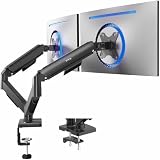
Spec line: Dual monitor stand for 17 to 32 inch screens up to 19.8 lbs, with fully adjustable arms and mechanical articulation.
AeroPoise is the lighter-duty option, and the 19.8 lbs limit is the lowest in this guide. That is fine for typical 24 or 27 inch monitors but leaves less margin for a heavy 32 inch panel. The listing calls out fully adjustable arms with mechanical articulation, so you should expect smooth positioning rather than a spring-balanced feel, and a 17 inch minimum screen size means very small displays may not suit it. It is a reasonable choice when you want a branded, well-known arm from a company that sells many mounts and you are confident your screens are on the lighter side. Check the clamp range and VESA pattern before buying.
- Pro: Fully adjustable arms
- Pro: Suited to 17 to 32 inch screens
- Pro: Well-known mount brand
- Con: 19.8 lbs limit is the lowest here
- Con: Minimum screen size is 17 inches
Acer Dual Monitor Arm

Spec line: Gas spring VESA mount stand for 17 to 32 inch screens, fully adjustable, VESA 75×75 and 100×100.
The Acer arm is a gas spring design, which usually means you can raise or lower a screen with a light push and it stays put. That matters most for people who switch between sitting and standing or move a screen to share it. The listing states VESA 75×75 and 100×100 support, which covers the vast majority of monitors sold today. The trade-off is that a gas spring is tuned for a weight range, and the weight per arm is not in the title we compared, so check the maker page to be sure your monitors sit within it. As the highest-priced pick near this ceiling, it makes sense if smooth adjustment is your priority rather than raw weight capacity.
- Pro: Gas spring for easy repositioning
- Pro: VESA 75×75 and 100×100 listed
- Pro: Fits 17 to 32 inch screens
- Con: Weight per arm not in the title
- Con: Near the top of this price tier
Mount-It! Dual Monitor Desk Mount

Spec line: Two independent gas spring arms for 13 to 32 inch screens, 17.6 lbs each, full motion, VESA 75×75 and 100×100.
Mount-It! gives the clearest spec set of the group: independent gas spring arms, a 17.6 lbs per arm limit and listed VESA compatibility. Independent arms mean each screen moves by itself, so you can keep one monitor high and another low without them dragging each other. The compromise is a modest weight limit. At 17.6 lbs per arm, it is built for standard 24 to 27 inch panels rather than heavy ultrawide or big gaming displays. Check each monitor’s weight with its stand removed, since arms usually count only the panel. If you have lighter, modern screens and like a spring-balanced feel, it is one of the better matches at this ceiling.
- Pro: Independent gas spring arms
- Pro: VESA 75×75 and 100×100 listed
- Pro: 13 to 32 inch screen range
- Con: 17.6 lbs per arm is modest
- Con: Not for heavy ultrawide panels
ErGear Dual Monitor Stand

Spec line: Dual monitor stand for screens up to 33 inches, max 22 lbs per arm, adjustable mount described as sturdy.
ErGear stretches the screen size ceiling to 33 inches while keeping a 22 lbs per arm limit, which is the combination to look at if you own larger monitors that are still reasonably light. The listing describes the mount as sturdy and adjustable, but it does not spell out gas spring, mechanical or other mechanisms, and cable routing is not mentioned. Because the title lacks a lower screen size, check that your smallest monitor still fits the bracket spacing. It is a practical choice for a desk with two similar large monitors where stability matters more than novelty, and for buyers who want a higher stated weight rating without going up in price tier.
- Pro: Up to 33 inch screens
- Pro: 22 lbs per arm rating
- Pro: Sturdy build described in listing
- Con: Arm mechanism not described
- Con: Minimum screen size not listed
How to Choose Dual Monitor Arms Under $75
Check weight per arm, not total
Weigh each monitor without its stand. Under about 12 lbs, any pick here is comfortable. Between 12 and 17 lbs, favor a gas spring model with a stated limit. Above 18 lbs, choose a 22 lbs arm and avoid the lighter ones.
Confirm VESA and screen size
Look at the back of each monitor for 75×75 or 100×100 hole spacing. Check that screens fall inside the arm’s listed range, such as 13 to 32 inches, and that curved or ultrawide models are explicitly supported.
Measure your desk for the clamp
Clamp mounts need a solid desktop edge, usually at least about 0.4 inch thick and under about 3.5 inches. Thin glass, hollow-core or waterfall edges often fail, so confirm the clamp range on the maker page.
Plan for small spaces, home offices and gaming
In a small space an arm reclaims the desk surface under each screen, which is its main benefit. At a home office desk, a gas spring arm eases adjustment when you move between tasks. For gaming, full motion lets you angle screens toward your seat.
FAQ
Are gas spring monitor arms better than mechanical ones?
Gas spring arms move with a light touch and stay put, which suits frequent adjustment. Mechanical or friction arms are simpler, but need more force to reposition.
Will a dual monitor arm fit a thin desk?
Only if the clamp range and desk material allow it. Thin glass or hollow-core desks can crack under the clamp, so check the clamp thickness limit on the maker page first.
What weight can these arms hold?
Listed limits in this guide run from 17.6 to 22 lbs per arm. Always check each monitor’s panel weight, not including the stand, against the figure on the listing.
Can I use two different monitor sizes?
Yes, if both fall inside the listed screen range and weight limit. Mixed sizes look better on independent arms, since each can be set to its own height.
Do dual monitor arms work for small spaces?
They help because the stand legs disappear and the desk surface returns. Pick a clamp mount over a free-standing base, and keep the arm reach short to avoid hitting a wall.
Last updated: November 2026
More from Amazon
Programs that pair well with the guide above. Offers and eligibility are set by Amazon and may change.
Collect the home and kitchen items you want in one registry that guests can shop from.
Create a wedding registrySet up recurring deliveries of everyday items on eligible products. Terms and savings are set by Amazon.
Explore Subscribe & SaveFree shipping on eligible items, Prime Video and more. Eligible new members can start with a free trial.
Start a Prime free trialAudiobooks and podcasts to listen to on the go. Eligible new members can start with a free trial.
Try Audible freeAs an Amazon Associate we earn from qualifying purchases.