Our Top Picks


The best computer desks under $150 are the Huuger 63-inch desk for a wide, thick, no-frills work surface and the ErGear 48-inch electric standing desk if you want height adjustment. The list covers six desks with drawers, shelves, power outlets and one electric sit-stand model, all compared from listing specifications rather than from assembling them. Check each maker page for assembly details, weight limits and exact dimensions before you buy.
Quick Comparison
| Model | Key specs per listing | Best for |
|---|---|---|
| Huuger 63 x 23.6 in Desk | 0.95 in thick desktop, power outlets, storage shelves, heavy duty | Wide, sturdy work surface |
| ErGear 48 x 24 in Electric Standing Desk | Height adjustable, 4 memory presets, steel frame, 176 lbs capacity | Sit-stand work |
| Furologee 60 in Desk With Drawers | 4 drawers, LED lights, power outlet, monitor stand, file cabinet | Storage-heavy setups |
| PRAISUN 55.1 in Desk | Power outlets, USB-C port, reversible, 4 fabric drawers | Charging and drawers |
| Lufeiya 47 in Desk With File Drawers | Reversible, filing cabinet, built for small spaces | Paperwork in a compact footprint |
| WINAZ 43 in Desk With Hutch | Hutch, built-in power outlet, storage shelves, white | Bedrooms and dorms |
1. Huuger 63 x 23.6 Inch Computer Desk
As an Amazon Associate we earn from qualifying purchases at no extra cost to you.

Spec line: 63 x 23.6 in, 0.95 in thick desktop, power outlets, storage shelves, heavy duty, rustic brown.
Huuger offers the widest surface in the list, and the listing highlights a 0.95-inch thick desktop, which usually helps resist wobble and sagging under a monitor and a laptop. The power outlets are built in, so you can plug in a monitor and charger without a separate strip, and storage shelves add vertical space for books and supplies. At 63 inches wide and 23.6 inches deep, it suits two monitors or a monitor plus writing room, but the depth is shallow compared with some desks, so a large monitor sits closer to you. The compromise is that wide desks need wall space of more than five feet, and assembly of a heavy-duty frame takes time. Check the maker page for weight capacity and shelf placement.
Pros: Wide, thick desktop; built-in power outlets; storage shelves.
Cons: Needs over five feet of wall space; shallow depth for large monitors.
2. ErGear 48 x 24 Inch Electric Standing Desk

Spec line: 48 x 24 in electric height-adjustable standing desk, 4 memory presets, stable steel frame, 176 lbs capacity, black.
ErGear is the only height-adjustable desk here, and that is a rare find in this tier. The listing mentions four memory presets, so you can save sitting and standing heights and switch with one press. A steel frame and a 176-pound capacity should handle a monitor, laptop and accessories, though a heavy dual-monitor setup deserves a look at the maker page. The surface is 48 by 24 inches, which is a standard size for one or two screens but smaller than the Huuger, and there are no drawers or shelves. It also needs a nearby outlet for the motor. If you are tired of sitting all day, this is the pick, and if you want storage, look at the drawer desks instead.
Pros: Electric height adjustment; four memory presets; steel frame.
Cons: No storage; needs an outlet nearby; smaller surface.
3. Furologee 60 Inch Desk With 4 Drawers
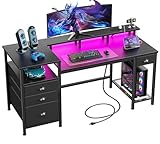
Spec line: 60 in desk, 4 drawers, LED lights, power outlet, full monitor stand, fabric file cabinet, printer space, shelf, black.
Furologee is built around storage. The listing names four drawers, a fabric file cabinet, a shelf, and space for a printer, which together can clear a lot of clutter from a work area. A full monitor stand is also part of the design, lifting a screen to eye level, and a power outlet and LED lights add convenience. The fabric drawers are lightweight and flexible but less sturdy than wood or metal, so they suit paper and supplies rather than heavy items. With so many parts, assembly will take longer than a basic desk. It suits anyone who works with printouts and files, and it is less attractive if you want a clean, minimal look.
Pros: Four drawers and file cabinet; monitor stand; printer space.
Cons: Fabric drawers are lightweight; longer assembly.
4. PRAISUN 55.1 Inch Computer Desk With Drawers

Spec line: 55.1 in, power outlets, USB-C port, reversible layout, 4 fabric drawers, rustic brown.
PRAISUN gives you modern charging features: power outlets plus a USB-C port, so a phone or laptop can charge without a wall adapter. A reversible layout lets you put the drawers on the left or right, which helps in awkward rooms. The 55.1-inch width is a good middle size, wide enough for a laptop and monitor but easier to fit in a bedroom than the 63-inch Huuger. The four fabric drawers are handy for small items, with the same limits as any fabric storage: they are not built for heavy loads. It is a solid middle option if you want charging and drawers without stepping up to the largest size.
Pros: Outlets and USB-C port; reversible layout; middle size.
Cons: Fabric drawers; fewer extras than the Furologee.
5. Lufeiya 47 Inch Desk With File Drawers

Spec line: 47 in reversible desk with file drawers cabinet, filing cabinet for small spaces, black.
Lufeiya pairs a compact 47-inch desktop with a filing cabinet, a combination that suits people who handle paperwork but have limited floor space. The reversible design lets you flip the cabinet to either side, which makes it easier to tuck into a corner or alcove. The listing does not give the weight capacity or drawer dimensions, so check whether a standard file folder fits. The smaller top suits a single monitor and a keyboard, but a dual-monitor setup will feel cramped. It is a reasonable choice for a student or someone who works from a bedroom and needs to keep documents handy.
Pros: Built-in filing cabinet; reversible; compact.
Cons: Small top; drawer details missing in the listing.
6. WINAZ 43 Inch Desk With Hutch

Spec line: 43 in white student desk with hutch, built-in power outlet, storage shelves, for small spaces.
WINAZ adds a hutch above the desk, which stacks storage vertically instead of spreading across the floor. The listing mentions a built-in power outlet, storage shelves, and a design for small spaces such as bedrooms and dorms. The white finish brightens a small room. The trade-off is surface area: at 43 inches wide, the desktop is the smallest in the group, so it works best with a laptop or a single monitor, and the hutch can crowd a large screen. It is also a lighter build than the thick-top desks. A good pick for students and small bedrooms, a less suitable pick for a full dual-monitor workstation.
Pros: Hutch adds vertical storage; built-in outlet; white finish.
Cons: Smallest surface; hutch can crowd tall monitors.
How to Choose Under $150
Match the width to your equipment
A single monitor needs about 40 to 48 inches. Two monitors or a monitor plus a writing area need 55 inches or more. Measure your wall space before ordering, and leave a few inches for cable access.
Check depth for monitors
Aim for at least 23 inches of depth so your eyes sit an arm’s length from the screen. Shallower desks put the monitor too close.
Consider desktop thickness and frame
A thicker top, like the 0.95-inch Huuger, resists sagging. Metal frames are generally sturdier than particleboard-only designs. Check the weight capacity if you use heavy equipment.
Decide on storage versus openness
Drawers and shelves help organization, but they take space and add assembly time. If you prefer a clean look, choose a simple desk and add a rolling cabinet later.
Plan for power
Built-in outlets and USB-C ports reduce clutter. Even so, you still need a wall outlet, so place the desk near one.
Think about assembly and delivery
Flat-pack desks arrive in heavy boxes, and a desk with drawers and a hutch has many more parts than a simple table. Allow a couple of hours, use a second person for the large panels, and build the desk in the room where it will live so you do not have to carry a finished piece through doorways. Keep the manual and spare hardware in a labeled bag in case you need to tighten the frame after a few weeks, since particleboard desks can loosen as they settle. If you plan to move often, a simpler frame with fewer drawers is easier to take apart and rebuild.
Set up the desk for comfort
Once the desk is built, set the monitor so the top edge sits at or slightly below eye level and about an arm’s length away. Keep your keyboard at elbow height with your forearms roughly parallel to the floor, and leave a few inches of clearance under the desktop for your knees. If a desk is slightly too high or low for your chair, adjust the chair first and add a footrest or a keyboard tray if needed. A sit-stand model like the ErGear makes this easier, since you can fine-tune the height for both postures and save each setting to a preset.
Computer Desks for Home Office, Small Spaces and Gaming
Which computer desks suit a home office?
The Furologee and Huuger offer the storage and surface area that a home office needs, and the ErGear adds standing options for long days.
Which are best for small spaces?
The WINAZ with its hutch and the compact Lufeiya use vertical or reversible designs to fit small rooms and corners.
Which suit gaming?
The Furologee lists LED lights and a monitor stand, and the Huuger has the width for multiple monitors. Check cable routing and outlet placement.
FAQ
Are fabric drawers durable?
They suit light items such as paper and supplies. They are not made for heavy loads, so avoid storing books or tools in them.
What is a reversible desk?
The layout can be assembled with the drawers or shelves on either side, so it fits left or right corners.
Do electric standing desks need assembly?
Yes, usually the frame, legs and top need to be fitted, and the control panel connected. Check the maker page for assembly time and tools.
How much weight can these desks hold?
The ErGear lists 176 lbs. Others do not state capacity in the listing, so check the maker page, especially for large monitors or heavy PCs.
Can I use a desk with a hutch for two monitors?
Probably not on a 43-inch desk. The hutch and small surface limit space. Choose a wider desk for two screens.
Last updated: November 2026
More from Amazon
Programs that pair well with the guide above. Offers and eligibility are set by Amazon and may change.
Collect the home and kitchen items you want in one registry that guests can shop from.
Create a wedding registrySet up recurring deliveries of everyday items on eligible products. Terms and savings are set by Amazon.
Explore Subscribe & SaveFree shipping on eligible items, Prime Video and more. Eligible new members can start with a free trial.
Start a Prime free trialAudiobooks and podcasts to listen to on the go. Eligible new members can start with a free trial.
Try Audible freeAs an Amazon Associate we earn from qualifying purchases.