Key takeaways
- Raises the screen and camera for calls
- Clean, minimal look
- Listed as a cooling stand
The best laptop stands under $100 are led by the Twelve South Curve, a cooling stand sold for MacBooks and other laptops that lifts the screen and camera for video calls. For adjustable height on a budget, the tounee telescopic stand adds a 360 swivel base. All six picks are compared from listing specifications.
Quick Comparison
| Model | Key specs (per listing) | Best for |
|---|---|---|
| Twelve South Curve | Cooling stand for MacBooks and laptops, lifts screen and camera | Video calls and clean desks |
| tounee Telescopic Stand | Telescopic height, 360 swivel base, sit to stand, 10-17 inch laptops | Adjustable height and standing |
| Rain Design iLevel2 | Adjustable height laptop stand, silver | Studio desks |
| Rain Design mStand | Fixed-angle laptop stand, silver | Simple fixed setup |
| Uncaged Ergonomics Adjustable Stand | 16.5 by 11 inch panel, 0-18 inch height, 12 lb capacity, 3.8 lb weight | Desk and lap use |
| Roost V3 | Adjustable, extremely portable laptop stand for PC and MacBook | Travelling |
This tier sits above the basic folding risers, so the stands here are sturdier, more finished or more specialised. Every pick is listed within the stated price ceiling and was compared from listing specifications rather than personal use. Where a listing is thin, as with the Rain Design and Roost entries, specs are marked not listed and you are pointed to the maker page. Two stands per brand at most, and no used or accessory-only listings.
1. Twelve South Curve Cooling Laptop Stand
Listing specs: Matte black desktop stand for MacBooks and laptops, lifts the screen and camera, listed as a cooling stand.
As an Amazon Associate we earn from qualifying purchases at no extra cost to you.
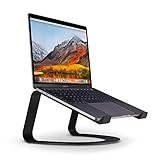
The Curve is the design-first choice. The listing describes an elegant desktop stand that raises the screen and the built-in camera, which is the part that makes video calls look better because the lens sits closer to eye level instead of pointing up your chin. It is marketed as a cooling stand for MacBooks and other laptops. The listing does not publish a weight rating or a laptop size range in the text we compared, so check the maker page if you use a 17 inch machine. It is a fixed-height shape rather than an adjustable one, so you get one good angle rather than a range. If your desk is already tidy and you want the stand to look like part of the setup, this is the most polished option in the tier.
Pros
- Raises the screen and camera for calls
- Clean, minimal look
- Listed as a cooling stand
Cons
- Fixed height, not adjustable
- Size and weight rating not listed
2. tounee Telescopic Laptop Stand with 360 Swivel Base
Listing specs: Telescopic height-adjustable stand, 360 degree swivel base, sit to stand use, portable riser, compatible with MacBook Pro and laptops from 10 to 17 inches.

The tounee is the most flexible stand here. Its telescopic column lets you raise a laptop to standing-desk height on a normal table, which is the feature the listing highlights with its sit to stand wording. The 360 degree base turns the laptop to face a colleague or a camera. Listed compatibility runs from 10 to 17 inches, so large notebooks are covered. It is more portable than a rolling cart and lighter on the budget than a full desk converter, though a telescopic column will always be less rigid than a solid aluminum block. If you type hard on a laptop, watch for wobble at full height. The listing does not give a weight rating in the compared text.
Pros
- Telescopic height for sit to stand use
- 360 degree swivel base
- Fits laptops up to 17 inches
Cons
- Less rigid at full height
- Weight rating not listed
3. Rain Design iLevel2 Adjustable Height Laptop Stand
Listing specs: Adjustable height laptop stand, patented design, silver. Size range and load rating not listed.

Rain Design has long supplied stands to people with a sleek desk and a metal laptop, and the iLevel2 is its adjustable-height model. The listing is brief: it states adjustable height and a patented mechanism, and nothing more about dimensions or weight limits, so confirm both on the maker page. What makes it useful is that you can choose a height in steps rather than accept a single fixed lift, which helps when two people of different heights share a desk. It occupies more desk space than a folding riser and does not fold flat, so it is a stand for a permanent desk. Pairing it with an external keyboard lets the laptop screen act as a proper second display.
Pros
- Adjustable height
- Metal studio look
- Established stand maker
Cons
- Does not fold for travel
- Listing gives no size or load figures
4. Rain Design mStand Laptop Stand
Listing specs: Laptop stand listed in silver. Dimensions, size range and load rating not listed.

The mStand is a long-running fixed riser. The compared listing only gives the product name and colour, so everything beyond that, including laptop size range and weight limit, is not listed and needs the maker page. In practice a fixed stand like this gives you one height and angle, which is simple and stable but cannot adapt to different users. It does not fold, and the footprint stays large, so it suits a dedicated workspace instead of a bag. If you want a stand that you set once and ignore for years, this style is hard to fault. If you want adjustability or portability, choose a different model from this list.
Pros
- Simple fixed design
- No moving parts to loosen
- Matches metal laptops
Cons
- Single fixed height
- Specs not listed in the compared text
5. Uncaged Ergonomics Adjustable Laptop Stand
Listing specs: 16.5 by 11 inch panel, adjusts 0-18 inches high, 12 lb capacity, 3.8 lb weight, detachable mouse pad, fits laptops and tablets (pink version listed).

The Uncaged stand gives the most numbers in its listing, which makes it easy to judge. The panel measures 16.5 by 11 inches, the height range is 0 to 18 inches, capacity is 12 lb and the stand weighs 3.8 lb. That tall height range means it can work as a sitting riser or even a standing setup on a table, and the detachable mouse pad is a useful extra. A 12 lb limit is fine for most ultrabooks but should be checked against heavy gaming laptops. The panel is wide, so it needs a bit of desk space, and the listing names a pink colour version, so check the colour you are ordering.
Pros
- Clear published specs
- Wide height range up to 18 inches
- Detachable mouse pad
Cons
- 12 lb limit excludes the heaviest laptops
- Takes more desk space than a folding riser
6. Roost V3 Laptop Stand
Listing specs: Adjustable and extremely portable laptop stand for PC and MacBook. Weight rating and size range not listed.

The Roost V3 is the travel option in this tier and the most expensive one here. The listing stresses portability and adjustability and mentions both PC and MacBook use, but it does not publish measurements, weights or laptop size limits in the compared text. That is a point to check on the maker page, especially if you carry a large or heavy laptop. It is the type of stand people throw in a bag for coworking spaces, hotels and trade shows, and the premium goes toward portability rather than desk presence. For a laptop that never leaves a home office, one of the sturdier desk stands will usually serve better.
Pros
- Designed for portability
- Adjustable
- Works with PC and MacBook
Cons
- Top of the price range
- Specs not listed in the compared text
Laptop Stands for Home Office, Small Spaces and Gaming
Laptop stands for home office
For long days at a desk, choose a stand that lets you set height rather than accept one angle. The tounee, Rain Design iLevel2 and Uncaged all list adjustable height, and the Twelve South Curve raises the camera for video calls. Combine any of them with an external keyboard and mouse, otherwise you trade a stiff neck for stiff wrists.
Laptop stands for small spaces
Compact desks do better with the Roost V3 or the tounee, which are made to be portable, than with wide platforms like the Uncaged panel. A stand that you can stash in a drawer keeps a shared room usable. If floor space is the issue rather than desk space, a telescopic column uses a smaller footprint than a rolling cart.
Laptop stands for gaming
Gaming laptops are heavy, and some of the specs here matter: the Uncaged lists a 12 lb capacity and the tounee lists support up to 17 inches. For other models, weight limits are not listed, so confirm on the maker page. A vented stand improves airflow around the base, but sustained heavy loads still benefit from a dedicated cooling pad.
How to Choose Under $100
Decide between fixed and adjustable
A fixed stand like the Rain Design mStand or Twelve South Curve gives one good height and nothing to loosen. An adjustable one lets two users share it and supports sit to stand use. If you work at different desks, go adjustable.
Check the weight and size range
In this tier you should expect a published laptop size range and, ideally, a load rating. If a listing gives neither, as with several here, check the maker page. For laptops over 6 lb, look for a rated capacity of at least 12 lb.
Think about where it will live
Permanent stands can be wider and heavier. Travel stands trade rigidity for portability. Decide whether the stand stays on one desk, since that choice rules out half the tier immediately.
Plan for the rest of the setup
A stand raises the screen but not the keyboard. Budget for an external keyboard and mouse, or the stand will not improve comfort. Standing use also needs a table high enough for your elbows to sit near 90 degrees.
FAQ
What is the best laptop stand for a home office?
The tounee telescopic stand suits most home offices because the height adjusts and the base swivels. If a fixed look matters more, the Twelve South Curve is cleaner.
Are the Rain Design stands good for small spaces?
They are solid metal stands but do not fold, so they suit a permanent desk. For a tight or shared space, a portable option like the Roost V3 is easier to store.
Which stand has the highest published weight capacity here?
The Uncaged Ergonomics stand lists a 12 lb capacity. Most other listings do not publish one, so confirm on the maker page.
Can these stands work for gaming laptops?
Some can, but check weight and size ratings first. The tounee lists 10-17 inch support and Uncaged lists 12 lb capacity; verify others with the maker.
Do I need an external keyboard with a laptop stand?
Yes. Raising the screen puts the built-in keyboard too high for comfortable typing, so pair any stand with a separate keyboard and mouse.
Last updated: November 2026
More from Amazon
Programs that pair well with the guide above. Offers and eligibility are set by Amazon and may change.
Collect the home and kitchen items you want in one registry that guests can shop from.
Create a wedding registrySet up recurring deliveries of everyday items on eligible products. Terms and savings are set by Amazon.
Explore Subscribe & SaveFree shipping on eligible items, Prime Video and more. Eligible new members can start with a free trial.
Start a Prime free trialAudiobooks and podcasts to listen to on the go. Eligible new members can start with a free trial.
Try Audible freeAs an Amazon Associate we earn from qualifying purchases.