Key takeaways
- Pro: 18 ports with 3 Thunderbolt 4
- Pro: 2.5GbE LAN and 98W charging
- Pro: 8K at 30Hz support
- Con: Top of this price tier
- Con: Needs a Thunderbolt laptop
The best laptop docking stations under $400 are the CalDigit TS4 for 18 ports and 98W charging, the Dell Pro Thunderbolt 4 Smart Dock for four 4K displays, and the Anker Prime 14-in-1 for 160W output. Each dock is compared from listing specifications: display outputs, charging wattage, Thunderbolt ports and data speed.
At this ceiling you move out of basic USB-C hubs and into Thunderbolt 4, Thunderbolt 5 and high-wattage docks built for laptops that run multiple 4K screens, fast storage and wired networking. The differences are how many displays the dock supports, how much power it passes to your laptop, and how many Thunderbolt or USB-C ports remain for peripherals. Home office, small-space and gaming use are covered in the picks and the FAQ below. Every pick sits well above the entry-level tier, so you are choosing between serious desk hubs rather than basic adapters.
Because we did not use these docks ourselves, every claim below traces back to listing text rather than personal experience. A dock is only as capable as the laptop that feeds it. Your laptop must have a Thunderbolt 4 or Thunderbolt 5 port to get the stated bandwidth, and the number of displays you actually get depends on its graphics hardware, so check both on the maker page before ordering.
Quick Comparison
| Model | Key specs per listing | Best for |
|---|---|---|
| CalDigit TS4 Thunderbolt 4 Dock | 18 ports, 98W charging, 3 Thunderbolt 4 ports, 5 USB-A, 2.5GbE, 8K at 30Hz | Power users with many devices |
| Dell Pro Thunderbolt 4 Smart Dock SD25TB4 | 130W, up to 4 displays at 4K, 2 DisplayPort 1.4, HDMI 2.1, 2 Thunderbolt 4 | Multi-display office desks |
| Anker Prime 14-in-1 Docking Station | Dual 4K HDMI, 160W max output, 10Gbps data transfer | High-wattage laptop charging |
| UGREEN 8-in-1 Thunderbolt 4 Dock | Dual 4K at 60Hz, 3 Thunderbolt 4 ports, 40Gbps, 85W charging | Mid-range Thunderbolt 4 |
| Plugable Thunderbolt 4 Dock | 100W charging, driverless, built for M4 and M5 MacBooks, 4K HDMI | MacBook desks |
| Anker Prime TB5 Docking Station | 14-in-1 Thunderbolt 5, 120Gbps max data, up to 8K, dual display | Newest Thunderbolt 5 laptops |
Charging wattage separates the group: 85W, 98W, 100W, 130W and 160W are all listed. A 16 inch performance laptop may need the higher numbers, while an ultrabook is fine with 85W. Display counts also differ, with the Dell listing up to four 4K displays and most of the others stopping at two. If you only need a USB-C hub, the lower tier is enough; the picks here make sense when you want Thunderbolt bandwidth and headroom.
CalDigit TS4 Thunderbolt 4 Dock
As an Amazon Associate we earn from qualifying purchases at no extra cost to you.

Spec line: 18-port Thunderbolt 4 dock with 98W charging, 3 Thunderbolt 4 ports at 40Gb/s, 3 USB-C and 5 USB-A at 10Gb/s, 2.5GbE LAN and 8K at 30Hz.
The TS4 is the most port-rich pick, and the listing reads like a spec sheet: three Thunderbolt 4 ports, eight more USB ports, 2.5GbE LAN and up to 8K at 30Hz. That makes it a good fit for a desk with many peripherals such as drives, audio interfaces, cameras and a wired network. The 98W charging figure covers most thin laptops and many 15 inch models. The trade-off is that it sits at the top of this price tier, leaving no room in the budget for extras, and it requires a Thunderbolt-capable laptop. It is a desk-sized unit, not a travel hub, so plan a permanent spot for it near a power strip, with room for the cables on every side. Choose it if you want a dock that will keep working as your gear grows.
- Pro: 18 ports with 3 Thunderbolt 4
- Pro: 2.5GbE LAN and 98W charging
- Pro: 8K at 30Hz support
- Con: Top of this price tier
- Con: Needs a Thunderbolt laptop
Dell Pro Thunderbolt 4 Smart Dock SD25TB4

Spec line: Thunderbolt 4 USB-C dock with 130W charging, up to 4 displays at 4K, 2 DisplayPort 1.4, HDMI 2.1 and 2 Thunderbolt 4 ports.
The Dell dock leads on display support: the listing says up to four 4K displays through two DisplayPort 1.4 ports, HDMI 2.1 and Thunderbolt 4. The 130W charging output is the highest-except-Anker in this guide and is enough for most business laptops. It fits an office desk with a multi-monitor workflow, such as spreadsheets, dashboards and video calls. The compromise is that the listing text does not say which non-Dell laptops are supported, and although Thunderbolt 4 is a standard, check compatibility notes on the maker page if you use another brand. Also, some of the 4K display modes may share bandwidth, so read the resolution table on the maker page before planning four screens.
- Pro: Up to 4 displays at 4K
- Pro: 130W charging listed
- Pro: DisplayPort 1.4 and HDMI 2.1
- Con: Compatibility with other brands not listed
- Con: Display modes may share bandwidth
Anker Prime 14-in-1 Docking Station Dual Monitor

Spec line: 14-in-1 laptop docking station with dual 4K HDMI, 160W max output and 10Gbps data transfer.
Anker Prime is the power pick. A 160W maximum output is enough for large performance laptops that cannot run properly on a smaller dock, and the listing pairs it with dual 4K HDMI and 10Gbps data. Fourteen ports means plenty of room for peripherals. The title does not mention Thunderbolt, so this is likely a USB-C dock, and you should check the maker page for display modes and whether it passes 160W to the laptop or splits it between ports. It does not offer the 40Gbps Thunderbolt bandwidth of the other docks, which matters for fast drives. Choose it if charging power is your top priority and you need dual displays, and check that your laptop charger and cable can carry the higher wattage.
- Pro: 160W max output
- Pro: Dual 4K HDMI
- Pro: 14 ports with 10Gbps data
- Con: Thunderbolt not mentioned
- Con: Lower bandwidth than Thunderbolt docks
UGREEN 8-in-1 Thunderbolt 4 Docking Station

Spec line: 8-in-1 Thunderbolt 4 dock with dual 4K at 60Hz (or single 8K), 3 Thunderbolt 4 ports at 40Gbps, 85W charging and gigabit networking.
UGREEN is the mid-priced Thunderbolt 4 pick. It lists three Thunderbolt 4 ports at 40Gbps, dual 4K at 60Hz or a single 8K display, and 85W charging, which covers a typical thin laptop. Eight ports is fewer than the CalDigit or Anker, but three of them are Thunderbolt, which suits fast drives and daisy-chained displays. The trade-off is power: 85W will not satisfy a large gaming or workstation laptop, so check your charger rating first. It makes sense for a home office with a thin laptop and a couple of 4K screens where raw port count is not the priority.
- Pro: 3 Thunderbolt 4 ports
- Pro: Dual 4K at 60Hz listed
- Pro: 85W charging
- Con: Only 8 ports
- Con: 85W is low for large laptops
Plugable Thunderbolt 4 Dock for MacBooks
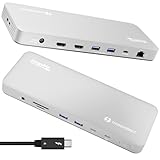
Spec line: Driverless Thunderbolt 4 laptop dock built for M4 and M5 MacBook Air and Pro, 100W charging and 4K HDMI.
Plugable’s listing targets MacBook owners directly, naming M4 and M5 models and noting that the dock is driverless, which means no software install. That is helpful on a Mac where external display handling can be restrictive. The 100W charging figure suits MacBook Air and most Pro models. The trade-off is that the title does not list the full port count or the number of displays supported, so check the maker page. MacBooks also have strict limits on extended displays from one port. It is a reasonable choice for a clean Mac setup where you value plug-in simplicity over the longest port list, and it suits Windows laptops with Thunderbolt 4 as well.
- Pro: Driverless setup
- Pro: 100W charging
- Pro: Built for recent MacBooks
- Con: Port count not in the title
- Con: Display count limited by the Mac
Anker Prime TB5 Docking Station

Spec line: 14-in-1 Thunderbolt 5 dock with up to 120Gbps data transfer, up to 8K and dual display support.
The Anker Prime TB5 is the forward-looking pick, with a Thunderbolt 5 interface and a listed 120Gbps maximum data transfer. That is for laptops that have Thunderbolt 5 ports, which are still new, so check your machine first. A Thunderbolt 4 laptop will connect but will not reach the top speeds, and a plain USB-C laptop will fall back further still. Fourteen ports and up to 8K support suggest a full hub, though the title does not give wattage. Price is the main trade-off: it uses most of the budget, and the benefits show up mainly with fast storage and multiple high-resolution displays. It is worth considering only if you own a Thunderbolt 5 laptop or plan to buy one soon, since a dock usually outlives the laptop it was bought for and a newer interface keeps it useful longer.
- Pro: Thunderbolt 5 with 120Gbps listed
- Pro: Up to 8K support
- Pro: 14 ports
- Con: Benefits need a Thunderbolt 5 laptop
- Con: Power delivery not listed in the title
How to Choose Laptop Docking Stations Under $400
Confirm your laptop’s port
Look for a Thunderbolt 4 or Thunderbolt 5 logo, which looks like a small lightning bolt. A plain USB-C port may still work with the dock, but the bandwidth and display count will be lower.
Match charging wattage
Check your laptop’s power adapter rating. An ultrabook needs about 65 to 100W, a 14 inch workstation around 100 to 140W, and a 16 inch performance model may need 140W or more.
Count displays and speeds
Two 4K 60Hz screens suit most home offices. For three or four, choose a dock that states it, such as the Dell. For fast external SSDs, look for 40Gbps or higher, not just 10Gbps.
Think about small spaces and gaming
In a small space, a compact dock behind a monitor saves room. For gaming, wired 2.5GbE or gigabit Ethernet reduces lag, but a dock does not boost the graphics of a laptop.
FAQ
Do I need Thunderbolt for a docking station?
Not for basic office work, but Thunderbolt adds bandwidth for multiple 4K screens and fast storage. If your laptop has a Thunderbolt port, it is worth using.
What wattage should a laptop dock provide?
Match your laptop’s original charger. Ultrabooks need about 65 to 100W, and performance laptops can need 140W or more, so confirm before buying.
Can a dock run four monitors?
Only if the dock and laptop both support it. The Dell lists up to four 4K displays, but most others stop at two, so check the display table.
Is Thunderbolt 5 worth it now?
Only if your laptop has a Thunderbolt 5 port. A Thunderbolt 4 laptop will work but will not reach the higher speeds, so it is mainly a future-proofing choice.
Are these docks good for MacBooks?
Yes, but MacBooks have limits on external displays. The Plugable lists MacBook support, and CalDigit and Dell docks are widely used, so check the display modes on the maker page.
Last updated: November 2026
More from Amazon
Programs that pair well with the guide above. Offers and eligibility are set by Amazon and may change.
Collect the home and kitchen items you want in one registry that guests can shop from.
Create a wedding registrySet up recurring deliveries of everyday items on eligible products. Terms and savings are set by Amazon.
Explore Subscribe & SaveFree shipping on eligible items, Prime Video and more. Eligible new members can start with a free trial.
Start a Prime free trialAudiobooks and podcasts to listen to on the go. Eligible new members can start with a free trial.
Try Audible freeAs an Amazon Associate we earn from qualifying purchases.