Key takeaways
- Elbow height first: Measure from the floor to your bent elbow while standing in your usual shoes, then choose a converter whose top height lands within an inch of that number. Reaching upward all day recruits your neck and shoulders and leaves you wired at bedtime.
- Surface width over gimmicks: A 32-inch top handles a laptop plus a monitor; 36 inches is the realistic minimum for dual displays with a separate keyboard. Cramped surfaces push you into a twisted, asymmetric posture within days.
- Clamp compatibility: Check your desktop’s edge thickness before buying clamp-on power strips or shelves. Most fit somewhere between 0.4 and 2.2 inches, and a mismatch means a rattling accessory or a returned box.
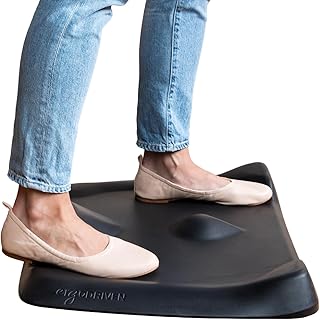
- Floor feedback: Flat mats let you lock your knees and stiffen up. Contoured “not-flat” mats encourage small, continuous weight shifts, which is what keeps circulation moving and your standing sessions lengthening.
- Evening light discipline: Prioritize accessories that let you push screens back and slightly down at eye level. Distance and downward gaze reduce the retinal light dose that suppresses melatonin during late work sessions.
What's inside
Most people shopping for standing desk gear are chasing better posture or fewer afternoon backaches. As someone who spends their days looking at sleep data, I’d argue the more interesting payoff happens twelve hours later. How much you move during daylight hours, how much load your legs carry, and how late in the evening you’re still hunched into a screen all feed directly into how quickly you fall asleep and how much deep sleep you get. A desk that lets you shift position is one of the quietest sleep interventions available — and it costs nothing in willpower once the setup is right.
The catch is that a standing desk on its own tends to fail. The riser is too small, the cables tug when it rises, the floor is punishing after twenty minutes, and the laptop has nowhere to live when you want the surface clear. This guide covers the accessories that actually keep a sit-stand routine alive: converters, clamp-mounted power, under-desk storage, and the anti-fatigue mat that makes standing sustainable rather than heroic.
As an Amazon Associate we earn from qualifying purchases.



How to Choose Standing Desk Accessories (2026)
- Elbow height first: Measure from the floor to your bent elbow while standing in your usual shoes, then choose a converter whose top height lands within an inch of that number. Reaching upward all day recruits your neck and shoulders and leaves you wired at bedtime.
- Surface width over gimmicks: A 32-inch top handles a laptop plus a monitor; 36 inches is the realistic minimum for dual displays with a separate keyboard. Cramped surfaces push you into a twisted, asymmetric posture within days.
- Clamp compatibility: Check your desktop’s edge thickness before buying clamp-on power strips or shelves. Most fit somewhere between 0.4 and 2.2 inches, and a mismatch means a rattling accessory or a returned box.
- Floor feedback: Flat mats let you lock your knees and stiffen up. Contoured “not-flat” mats encourage small, continuous weight shifts, which is what keeps circulation moving and your standing sessions lengthening.
- Evening light discipline: Prioritize accessories that let you push screens back and slightly down at eye level. Distance and downward gaze reduce the retinal light dose that suppresses melatonin during late work sessions.
The Best Standing Desk Accessories (2026) Reviewed
Ergodriven Topo Mini Standing Desk Mat
The sculpted terrain is the whole point: the mounds and edges invite you to reposition without thinking about it, which is exactly the low-grade movement that improves overnight recovery. The Mini’s smaller footprint suits home offices where a full-size mat becomes a trip hazard, and the dense foam holds its shape far longer than flat gel alternatives.
FITUEYES 36″ Sit-to-Stand Converter
This is the one I recommend to anyone running two monitors or a laptop-plus-display setup, since the wider deck lets you center your primary screen instead of angling your torso toward it. Assembly is genuinely quick, and the height range covers most adults from seated typing to full standing height.
FITUEYES 32″ Sit-to-Stand Converter
The narrower sibling is the smarter buy for single-monitor or laptop workers, especially on shallower desks where a 36-inch top would overhang. It delivers the same lift mechanism and stability in a footprint that leaves room for a notebook beside it.
CCCEI 15-Outlet Desk Clamp Power Strip
Fifteen widely spaced outlets means bulky adapters stop stealing their neighbors’ slots, and the flat plug tucks behind furniture without stressing the cord. Clamping power to the desk edge also solves the classic converter problem of cables going taut mid-lift.
Anker Nano Desk Clamp Power Strip
A tidier option for minimal setups: six AC outlets, two USB-C ports at up to 70W, and 1500J of surge protection in a housing small enough to disappear under the desk lip. The 0.6–1.8 inch clamp range covers nearly every standard desktop.
Frequently Asked Questions
Can standing at work really improve my sleep?
Indirectly, yes. Standing and shifting weight raises daily energy expenditure and light physical activity, both of which are associated with faster sleep onset and more slow-wave sleep. It won’t override caffeine or a chaotic schedule, but it’s a reliable contributor.
How long should I stand at a time?
Aim for roughly 15 to 30 minutes of standing per hour, alternating rather than committing to marathon sessions. Fatigue is a sign to sit, not to push through — soreness late in the day can fragment sleep.
Do I need a mat if I’m wearing shoes?
Usually. Shoes cushion impact but don’t prompt movement; a contoured mat does. If you work barefoot or in socks, a mat becomes essential rather than optional.
Is a converter as good as a full standing desk?
For most home offices, a converter is the better value and preserves your existing desk. Full electric desks win on stability and monitor-arm mounting, but a well-sized converter delivers the same postural variety.
Final Thoughts
If you build one setup this year, pair the FITUEYES 36-inch converter with the Ergodriven Topo Mini and add the Anker Nano clamp strip to keep cables off the floor. That combination removes nearly every excuse to stay seated, and the sleep benefits show up quietly, a few weeks in, without you having to track a thing.