Key takeaways
- Lift mechanism: Gas-spring and pneumatic risers move with one squeeze of a lever, which matters more than it sounds — if a transition takes effort, you’ll stop making them by Wednesday. Electric models remove even that friction at the cost of a power outlet.
- Standing height range: Measure from your floor to your bent elbow, then subtract your desk height. Your monitor’s top edge should land at or just below eye level so your neck stays neutral and your gaze doesn’t tip downward for hours.
- Surface width and monitor load: A 32-inch top handles a laptop plus one display comfortably; go to 36 inches if you run dual monitors or want elbow room for notebooks and a mug.
- Keyboard tray depth: A separate lower tray keeps your wrists flat and your shoulders down. Shallow trays force you to reach forward, which loads the upper back and undoes much of the benefit.
- Stability under motion: Typing while standing introduces sway. Look for a wide steel base and a locking mechanism that holds firm at full extension — wobble at eye level is genuinely distracting.
What's inside
Most people shopping for a standing desk converter are chasing an afternoon problem: the 2 p.m. slump, the heavy eyelids, the sense that the body has quietly clocked out while the inbox keeps filling. As someone who spends most days working with clients on sleep architecture and circadian timing, I can tell you that slump is rarely about willpower or caffeine. It’s about posture, light exposure, and the near-total absence of movement between the first meeting and the last. Sitting for nine unbroken hours compresses breathing, blunts alertness, and — this is the part people miss — steals the physical fatigue your body needs to fall asleep easily that night.
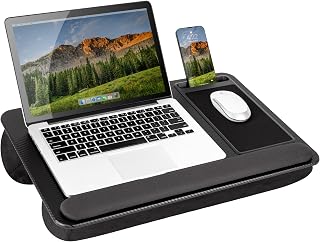
A converter sits on the desk you already own and lets you shift between sitting and standing in seconds, which makes it the lowest-friction way to break up a sedentary day. This guide covers the models worth your money in 2026: what to look for in lift mechanism, tray depth, and monitor capacity, honest reviews of the five strongest options, and answers to the questions I hear most from clients who want better energy during the day and deeper sleep at night.
As an Amazon Associate we earn from qualifying purchases.


How to Choose a Standing Desk Converter (2026)
- Lift mechanism: Gas-spring and pneumatic risers move with one squeeze of a lever, which matters more than it sounds — if a transition takes effort, you’ll stop making them by Wednesday. Electric models remove even that friction at the cost of a power outlet.
- Standing height range: Measure from your floor to your bent elbow, then subtract your desk height. Your monitor’s top edge should land at or just below eye level so your neck stays neutral and your gaze doesn’t tip downward for hours.
- Surface width and monitor load: A 32-inch top handles a laptop plus one display comfortably; go to 36 inches if you run dual monitors or want elbow room for notebooks and a mug.
- Keyboard tray depth: A separate lower tray keeps your wrists flat and your shoulders down. Shallow trays force you to reach forward, which loads the upper back and undoes much of the benefit.
- Stability under motion: Typing while standing introduces sway. Look for a wide steel base and a locking mechanism that holds firm at full extension — wobble at eye level is genuinely distracting.
The Best Standing Desk Converters (2026), Reviewed
VIVO 36″ V Series Converter (DESK-V000V)
The most complete package here: a generous 36-inch top, a deep keyboard tray, and a gas-spring lift that glides through its range without drift. If you run two monitors and want a converter you’ll actually use several times a day rather than twice a week, this is the one I recommend first.
PowerPro 36″ Electric Converter
Push-button motorized adjustment eliminates the last excuse for staying seated, and the wide tray accommodates dual displays plus a laptop without crowding. Worth the premium if you have shoulder or wrist limitations that make lever-operated lifts uncomfortable.
VIVO 32″ K Series Converter (DESK-V000K)
A smart middle ground for standard-depth desks — narrower footprint, same steel build quality and wide keyboard tray as its larger sibling. The taller maximum height suits users above roughly 6 feet who find other 32-inch risers bottom out early.
FITUEYES 36″ Sit-to-Stand Converter
Strong value for dual-monitor setups, with a broad platform and assembly that genuinely takes minutes rather than an afternoon. The lift feels slightly firmer than VIVO’s, which some users prefer for stability at full standing height.
VIVO 32″ Standing Desk Riser (DESK-V000S)
The minimalist pick: near-zero assembly, quick squeeze-and-rise operation, and a low profile that disappears into a small home office. Best for laptop-plus-single-monitor users who want fewer parts and a smaller visual footprint.
Frequently Asked Questions
Can standing more during the day really improve my sleep?
Indirectly, yes. Upright posture and light movement support daytime alertness and physical fatigue accumulation, both of which strengthen your sleep drive by evening. Standing is not a substitute for real exercise or consistent sleep timing, but it removes a common obstacle.
How long should I stand at a time?
Aim for 15 to 30 minutes per hour rather than a single long stint. Alternating is what protects your joints and keeps your energy steady; standing rigidly for three hours simply trades one static posture for another.
Will a converter fit my existing desk?
Most need 24 to 30 inches of depth and a stable, flat surface. Measure your desk depth first, and confirm the weight rating covers your monitors, laptop, and anything else that lives on the platform.
Should I use a standing desk late in the evening?
I’d stop an hour or two before bed. Standing raises alertness and core temperature slightly, and your body needs both to fall, not rise, as it moves toward sleep.
Final Thoughts
For most home offices, the VIVO 36″ V Series delivers the best balance of surface area, tray depth, and smooth one-handed operation. Choose the PowerPro 36″ Electric if effortless motorized transitions will make you switch positions more often, or the VIVO 32″ K Series if you’re working with a shallower desk and want the same build quality in a tighter footprint. Whichever you pick, the real return comes from using it in short, frequent intervals — that rhythm is what your afternoons and your nights will notice.