Key takeaways
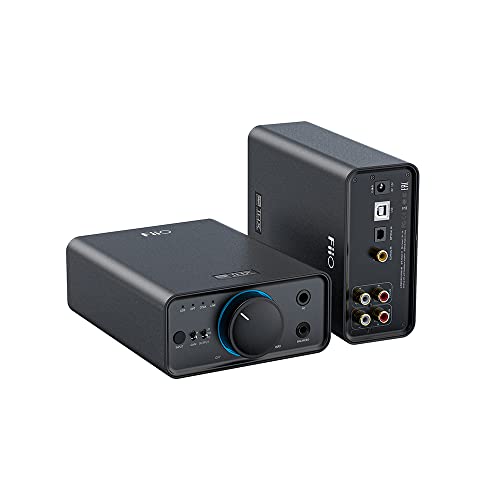
- Best all-in-one desktop unit: FiiO K11, with USB, optical and coaxial inputs plus headphone and speaker outputs.
- Best speakers-only upgrade: Schiit Modi+, especially if you already own a separate headphone amplifier.
- Best compact USB headphone DAC: iFi ZEN DAC 3, with front headphone connections and a bus-powered design.
- Best value for a small desk: SMSL SU-1, if you need line-level RCA output but not a built-in headphone amplifier.
- Best for several digital sources: Topping E30 II, which combines USB, optical and coaxial inputs in a small enclosure.
The best desktop DACs for clearer computer audio depend on whether you need a headphone amplifier, multiple digital inputs, balanced outputs, or simply a compact USB upgrade; for most desks, the FiiO K11 is the most versatile all-in-one choice, while the Schiit Modi+ is the better pick for speakers-only systems.
Our top picks


As an Amazon Associate we earn from qualifying purchases at no extra cost to you. Ratings are shown as listed on Amazon.
Quick picks by computer-audio setup
- Best all-in-one desktop unit: FiiO K11, with USB, optical and coaxial inputs plus headphone and speaker outputs.
- Best speakers-only upgrade: Schiit Modi+, especially if you already own a separate headphone amplifier.
- Best compact USB headphone DAC: iFi ZEN DAC 3, with front headphone connections and a bus-powered design.
- Best value for a small desk: SMSL SU-1, if you need line-level RCA output but not a built-in headphone amplifier.
- Best for several digital sources: Topping E30 II, which combines USB, optical and coaxial inputs in a small enclosure.
What a desktop DAC changes—and what it does not
A digital-to-analog converter turns the digital signal from a computer, streamer or game console into an analog signal that powered speakers, an integrated amplifier or headphones can use. A separate DAC can reduce dependence on a computer’s noisy analog circuitry and gives you physical volume controls, better connectivity and a more convenient headphone connection.
It will not make poor recordings sound perfect, and it cannot compensate for badly positioned speakers or a weak headphone driver. For a laptop feeding powered speakers, the practical improvement is often cleaner connections and easier volume control rather than a dramatic change in every recording.
Head-to-head comparison
| Model | Digital inputs | Outputs and headphone support | Power requirement | Approx. footprint | Typical market range |
|---|---|---|---|---|---|
| FiiO K11 | USB, optical, coaxial | RCA line out, 6.35 mm and 4.4 mm headphone outputs | External AC power | 147 × 133 mm | Usually $150–$250 |
| Schiit Modi+ | USB, optical, coaxial | RCA line out; no built-in headphone amplifier | External power supply | 127 × 89 mm | Usually $130–$180 |
| Topping E30 II | USB, optical, coaxial | RCA line out; no built-in headphone amplifier | External 5 V power | 152 × 127 mm | Usually $150–$220 |
| iFi ZEN DAC 3 | USB | RCA line out, 4.4 mm balanced and 6.35 mm headphone outputs | USB bus power; optional external supply supported | 158 × 117 mm | Usually $200–$300 |
| SMSL SU-1 | USB, optical, coaxial | RCA line out; no built-in headphone amplifier | USB power | 138 × 98 mm | Usually $80–$130 |
Dimensions are approximate chassis measurements; allow additional space for cables, ventilation and access to controls. Prices are broad market ranges and can vary by region and package contents.
Which DAC is right for your situation?
| Your situation | Best match | Why |
|---|---|---|
| Laptop plus powered speakers | SMSL SU-1 or Schiit Modi+ | Both provide a straightforward RCA line output without paying for headphone hardware you may not use. |
| Headphones and speakers on one desk | FiiO K11 | It combines a headphone amplifier, physical volume control and speaker-compatible line output. |
| Small apartment or shallow desk | iFi ZEN DAC 3 or SMSL SU-1 | The low-profile horizontal cases fit beneath many monitor stands, though cable clearance still matters. |
| Computer plus game console or television | FiiO K11, Topping E30 II or Schiit Modi+ | USB, optical and coaxial inputs make source switching easier than on a USB-only unit. |
| Existing headphone amplifier or stereo amplifier | Topping E30 II or Schiit Modi+ | These focus on conversion and line output, avoiding duplicate headphone circuitry. |
Inputs: USB is not always enough
USB for computers
USB is the essential input for a Windows PC, Mac, Chromebook or many tablets. Current USB DACs generally appear as an audio output device, although Windows users may need a manufacturer driver for higher sample rates or certain advanced features. macOS and ChromeOS commonly recognize class-compliant USB audio devices without a separate driver.
Check the connector before buying. A DAC may use USB-B, USB-C or USB micro-B on its chassis, while your computer may require a USB-C-to-USB-C cable, a USB-A-to-USB-B cable or an adapter. The connector shape does not determine sound quality, but it determines whether the unit is convenient on your desk.
Optical and coaxial for other equipment
Optical input is useful for a television, game console or computer with an optical output because it electrically isolates the source and avoids ground-loop hum. Coaxial digital input is common on older hi-fi equipment and some streamers. If you expect to add a console or television later, a multi-input DAC is worth considering even if you currently use only USB.
Headphone support and output choices
A DAC with RCA outputs is not automatically a headphone amplifier. The Schiit Modi+, Topping E30 II and SMSL SU-1 are primarily line-level DACs, so headphones require a separate amplifier or a powered headphone input elsewhere in the system.
The FiiO K11 and iFi ZEN DAC 3 include headphone amplification. A 6.35 mm connection is convenient for many full-size headphones, while a 4.4 mm balanced output can provide a different wiring option for compatible headphones. Balanced output does not automatically make every headphone sound better, and you should not use an adapter that joins balanced channels together. For ordinary headphones, a standard 3.5 mm or 6.35 mm output is usually the simplest choice.
Desk space, ventilation and power
Do not measure only the DAC’s footprint. A practical setup needs roughly 50 mm of free space behind the unit for stiff USB, RCA and power cables, plus about 25–50 mm above it if the enclosure becomes warm. On a 24-inch-wide desk, a 150 mm DAC uses less than one-quarter of the width, but a side-mounted headphone plug can add 60–100 mm to the required working space.
USB-powered models are convenient for a laptop and reduce outlet clutter. They can also draw power from a computer that is asleep or running on battery, so check your computer’s power-management behavior. Models with external AC adapters generally offer more output power and a more stable permanent installation, but the adapter consumes another outlet and adds a cable behind the desk.
Keep the DAC away from a monitor’s power brick, unshielded chargers and crowded cable bundles if you hear hum. Digital interference is uncommon with well-designed units, but tidy cable routing makes troubleshooting much easier.
Compatibility checklist before buying
- Computer: Confirm Windows, macOS or ChromeOS support and whether a driver is needed.
- USB port: Match USB-A, USB-C or USB-B requirements, or budget for the correct cable.
- Speakers: Powered speakers usually need RCA or sometimes 3.5 mm input; passive speakers need an amplifier after the DAC.
- Headphones: Check the connector size and whether the DAC includes enough amplification for difficult-to-drive models.
- Extra sources: Choose optical and coaxial inputs if a television, console or streamer may join the system.
- Volume control: A DAC with a knob is useful for powered speakers and headphones; fixed-output units work best with an amplifier that controls volume.
Bottom line
Choose the FiiO K11 when one compact box must handle headphones, powered speakers and several digital sources. Choose the Schiit Modi+ or Topping E30 II when you already have amplification and want flexible inputs with a small footprint. Choose the iFi ZEN DAC 3 for a USB-first headphone setup, and the SMSL SU-1 when the priority is inexpensive, compact RCA output for powered speakers. In every case, reserve cable clearance behind the unit and verify the computer connector before ordering; those practical details affect daily usability more than a small difference in published specifications.