Key takeaways
- Auto-dimming sensor
- Touch control with manual override
- Space-saving clip design
The best monitor light bars under $75 start with the Quntis Auto-Dimming Monitor Lamp for a no-fuss eye-care lamp, and the YEELIGHT RGB model for smart-home control through Matter and Alexa. All six picks are compared from listing specifications, clip on top of the screen, and keep the desk surface free.
Quick Comparison
| Model | Key specs (per listing) | Best for |
|---|---|---|
| Quntis Auto-Dimming Monitor Lamp | USB, auto-dimming, touch control, no glare, space saving | Hands-off eye care |
| Quntis Monitor Light Bar Pro | Stepless dimming, auto-dimming, dual control, white | Modern desks |
| ROTOPATA 15.8 Inch Light Bar | 15.8 inch, auto dimming, CRI Ra97, 2700K-6500K, touch control | Color accuracy |
| YEELIGHT RGB Light Bar | 350LM, Ra98, RGB backlight, Matter and Alexa, stepless dimming | Smart-home setups |
| YEELIGHT Touch Light Bar | 250LM, touch control, stepless dimming, flat and curved monitors | Simple, bright and cool |
| ONWAY Curved Monitor Light Bar | Wireless remote, auto-dimming, camera base, curved monitors | Curved screens and webcams |
Every light bar below is listed within the stated price ceiling and was compared from listing specifications rather than personal use. Brightness, color temperature range and control type come from the listing; where a figure is not stated it is marked as not listed. Desk lamps with clamps were left out, because this list is limited to lights that sit on the monitor itself. Two picks per brand at most. Because a light bar is a small device, the spec lines below focus on light output, control type and screen fit, which are the details that decide whether it suits your desk.
1. Quntis Computer Monitor Lamp with Auto-Dimming
Listing specs: USB monitor light bar for eye care, auto-dimming, adjustable brightness, touch control, no screen glare, space saving.
As an Amazon Associate we earn from qualifying purchases at no extra cost to you.

This Quntis is the straightforward choice for a desk that needs good task lighting without a lamp base. The listing highlights auto-dimming, which means a built-in sensor changes brightness with the room light, so you do not keep adjusting it when clouds pass or evening arrives. Touch control and adjustable brightness mean you can still override the sensor. The no-glare design aims light at the desk rather than the screen, which keeps reflections off the display. It is powered by USB, so it needs a free port on the monitor or PC. The listing does not state a lumen figure or color temperature range in the text we compared, so look at the maker page if you need exact numbers for photo or design work.
Pros
- Auto-dimming sensor
- Touch control with manual override
- Space-saving clip design
Cons
- Lumen and color temperature range not listed
- Needs a USB power source
2. Quntis Monitor Light Bar Pro (White)
Listing specs: Eye-care no-glare USB monitor lamp, stepless dimming and auto-dimming brightness, dual control, white finish.

The Pro version adds more control options than the base Quntis. The listing mentions stepless dimming, auto-dimming and dual control, which in practice means you can use the on-device touch controls and a second method of adjustment. The white finish suits light desks or setups with white monitors, a small but real style point. Like the others it is a USB-powered, no-glare bar that clips on top of the screen. The listing does not give a lumen figure in the compared text. If you work long hours and like to fine-tune brightness through the day, the stepless control gives smooth changes instead of fixed steps. If you are fine with fewer options, the standard model is enough.
Pros
- Stepless plus auto-dimming
- Dual control options
- White finish option
Cons
- Brightness numbers not listed
- More controls than many people need
3. ROTOPATA Monitor Light Bar 15.8 Inch
Listing specs: 15.8 inch monitor lamp, auto dimming, CRI Ra97, 2700K-6500K color temperature, no-glare asymmetric light, stepless dimming, touch control.

ROTOPATA is the one that publishes the numbers that matter for color work. The listing gives CRI Ra97 and a 2700K to 6500K temperature range, which covers warm evening light through to cool daylight. A high CRI value means colors under the lamp look closer to how they appear in natural light, useful for anyone sorting swatches, editing prints or just caring about how paper looks on the desk. The asymmetric design directs light down toward the desk and away from the screen. It is 15.8 inches wide, which suits 24 to 27 inch monitors best. Lumen output is not listed in the compared text.
Pros
- Ra97 CRI published
- 2700K-6500K range
- Asymmetric no-glare design
Cons
- Lumen output not listed
- 15.8 inch width suits mid-size monitors
4. YEELIGHT Monitor Light Bar with RGB Backlight
Listing specs: 350LM, Ra98, RGB backlight, works with Matter and Alexa, dimmable no-glare eye-care LED, USB powered, stepless dimming.

This YEELIGHT is the connected option. It lists Matter and Alexa compatibility, so it can fit into a smart-home routine such as turning on at sunrise or dimming at night. It also publishes 350 lumens and a Ra98 color rendering figure, among the strongest numbers in this price tier, and adds an RGB backlight that glows behind the monitor for ambience. For gaming and streaming that is a nice extra, while the main light still points down at the desk without glare. If you do not use smart-home features or want a plain lamp, you are getting functions you may never use. The listing does not state a color temperature range in the compared text.
Pros
- 350 lumens and Ra98 published
- Matter and Alexa support
- RGB backlight
Cons
- Smart features are extras many will skip
- Color temperature range not listed
5. YEELIGHT Monitor Light Bar with Touch Control
Listing specs: 250LM no-glare eye-care light bar, touch control, USB powered, stepless dimming, for flat and curved monitors.

The plain YEELIGHT keeps to the basics: 250 lumens, touch control, stepless dimming and a no-glare shape for flat and curved screens. It clips on and plugs into USB. The listing does not mention auto-dimming or smart-home features, which is what keeps it simple. It also does not state a color rendering figure, so it is a good bet for general office lighting rather than for color-critical work. For a home office desk where you want a light that is easy to use and fits a curved monitor, it covers the essentials. Compared with the Quntis Auto-Dimming model, you adjust brightness yourself instead of relying on a sensor.
Pros
- 250 lumens published
- Fits flat and curved screens
- Simple touch control
Cons
- No auto-dimming listed
- No color rendering figure listed
6. ONWAY Curved Monitor Light Bar with Wireless Remote
Listing specs: Curved monitor light bar with wireless remote, auto-dimming, camera base, no screen glare, for all screens and home office use.
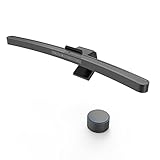
ONWAY targets curved monitors and anyone with a webcam. The listing mentions a camera base, which presumably gives a flat spot for a webcam, and a wireless remote so you can adjust brightness without reaching up to the screen. Auto-dimming is listed. The no-glare, home-office framing matches the rest of the tier. It sits at the top of the price range here, so the extra goes toward the remote and the curved-screen design. The listing does not publish lumens or color temperature in the compared text, and the camera base specifics are not detailed, so check the maker page if you plan to mount a particular webcam.
Pros
- Wireless remote
- Auto-dimming
- Camera base for webcams
Cons
- Lumens and color temperature not listed
- Camera base details not specified
Monitor Light Bars for Home Office, Small Spaces and Gaming
Monitor light bars for home office
For paperwork next to a keyboard, a glare-free light bar with adjustable brightness is the main need. The Quntis Auto-Dimming and ROTOPATA adjust to the room, and a warm setting in the evening is easier on the eyes. Position the bar so the beam lands on the desk, not on the display.
Monitor light bars for small spaces
A bar that sits on the monitor takes no desk area, which matters on a narrow desk where a lamp base would crowd the keyboard. All six clip on and plug into USB, so they leave the surface free for notebooks or a second device.
Monitor light bars for gaming
Gaming setups benefit from the YEELIGHT RGB with its backlight, which adds a glow behind the screen and can reduce contrast strain in a dark room. Keep the main beam low and dim in dark rooms so it does not reflect off the screen.
How to Choose Under $75
Decide on lighting features
Auto-dimming suits users who do not want to touch the lamp. Stepless manual dimming gives more control. Pick based on whether you prefer set-and-forget or fine control.
Look for published light numbers
For color-sensitive work, look for a CRI figure of 95 or higher and a color temperature range such as 2700K-6500K. Where a listing is silent, treat it as not listed and check the maker page.
Check monitor compatibility
Light bars clip on top of the screen. Curved monitors and very thin frames need a model made for them, such as the ONWAY or YEELIGHT listings that mention curved screens.
Think about power and control
All six use USB, so you need a free port or a USB adapter. Remotes and touch controls are convenient, but check where the controls sit so you can reach them without moving the lamp.
Placement and brightness settings
Mount the bar centered on top of the screen and tilt the beam so it lands on the keyboard and the area just beyond it. In a bright room keep the output low, since the goal is to balance the screen, not to flood the desk. For late sessions, switch to a warm color temperature if the lamp supports one, because cooler light is the usual cause of the harsh look that makes people turn lamps off.
FAQ
What is the best monitor light bar for a home office?
The Quntis Auto-Dimming Monitor Lamp suits most home offices because it adjusts to the room automatically and clips on without taking desk space or needing a separate base.
Do monitor light bars reduce eye strain?
They can reduce contrast between a bright screen and a dark room. Pick one with no-glare design and keep brightness near the room level.
Will a light bar fit a curved monitor?
Yes if the listing says so. The ONWAY and both YEELIGHT models mention curved screens; check the clip size on the maker page.
Is a monitor light bar better than a desk lamp?
It saves desk space and lights the keyboard area directly, whereas a desk lamp lights a wider area and can be moved. For small desks and shared tables, a light bar is usually the better fit.
Can I use a light bar for gaming or streaming?
Yes. The YEELIGHT RGB adds a backlight for ambience, and the ONWAY has a camera base. Keep the main light low to avoid glare on the screen.
Last updated: November 2026
More from Amazon
Programs that pair well with the guide above. Offers and eligibility are set by Amazon and may change.
Collect the home and kitchen items you want in one registry that guests can shop from.
Create a wedding registrySet up recurring deliveries of everyday items on eligible products. Terms and savings are set by Amazon.
Explore Subscribe & SaveFree shipping on eligible items, Prime Video and more. Eligible new members can start with a free trial.
Start a Prime free trialAudiobooks and podcasts to listen to on the go. Eligible new members can start with a free trial.
Try Audible freeAs an Amazon Associate we earn from qualifying purchases.