Key takeaways
- CRI 95 or higher is listed
- USB-A and USB-C charging
- Foldable design and 4 color settings
The best desk lamps under $50 start with the Honeywell H01 Pro for a foldable lamp with a CRI of 95 or higher, and the MACASA dual-head clamp lamp for wider desks. Every pick was compared from listing specifications and sits at or under the $50 ceiling.
A good desk lamp lowers glare, lights your keyboard and papers, and keeps your eyes from working harder in the evening. Under this ceiling you can get a clamp-on architect lamp, a monitor light bar or a lamp with a wireless charging base, and the right one depends on how your desk is laid out.
The six picks below were compared from listing specifications only. Where the listing text is short on numbers such as lumen output, the write-up says so and suggests checking the maker page.
The group splits into three kinds. The Honeywell and JOSTIC are base-mounted lamps, the MACASA, Pzloz and SIBRILLE are clamp-on architect lamps, and the Quntis is a monitor light bar that sits on the top of a screen without taking up desk space.
Quick Comparison
| Model | Key specs (per listing) | Best for |
|---|---|---|
| Honeywell H01 Pro Foldable Desk Lamp | Honeywell H01 Pro LED desk lamp, foldable, CRI 95 or higher, 4 colors, A+C charging, Sunturalux chips, dimmable | Eye-friendly light with USB charging |
| MACASA Dual-Head Clamp Desk Lamp | MACASA LED desk lamp with clamp, dual head monitor light, remote, 24W, dimmable, eye-caring task lamp with timer, anti-glare | Wide desks and dual screens |
| Pzloz Dual-Screen Architect Lamp | Pzloz LED desk lamp for office and home, eye-caring architect lamp with clamp, dual screen computer monitor work light | Dual screens |
| SIBRILLE Clamp Architect Task Lamp | SIBRILLE LED desk lamp for home office, dimmable computer desk light with clamp, modern architect task lamp with color settings | Modern look |
| Quntis Monitor Light Bar | Quntis computer monitor lamp, screen light bar for eye caring, USB reading LED task lamp with auto-dimming | Small desks and gaming |
| JOSTIC Desk Lamp With Wireless Charger | JOSTIC LED desk lamp with wireless charger, USB charging port, eye care, 10 brightness levels, 5 color modes, touch control | Charging a phone at the desk |
1. Honeywell H01 Pro LED Desk Lamp
Honeywell H01 Pro LED desk lamp, foldable, CRI 95 or higher, 4 colors, A+C charging, Sunturalux chips, dimmable
As an Amazon Associate we earn from qualifying purchases at no extra cost to you.

The Honeywell H01 Pro is the most complete lamp under this ceiling. The listing gives a CRI of 95 or higher, four color settings, dimming and both USB-A and USB-C charging, which means one lamp can also top up a phone.
It is a foldable base lamp, so it uses desk space and is less flexible than a clamp. The listing text we have does not state lumen output, so check the maker page if you work on detailed tasks. For general reading and computer work, the high CRI is a clear plus.
Pros
- CRI 95 or higher is listed
- USB-A and USB-C charging
- Foldable design and 4 color settings
Cons
- Takes desk space compared with a clamp
- Lumen output not shown in listing text
2. MACASA LED Desk Lamp With Clamp, Dual Head
MACASA LED desk lamp with clamp, dual head monitor light, remote, 24W, dimmable, eye-caring task lamp with timer, anti-glare

MACASA’s lamp has two heads, a clamp mount, a remote, a timer and 24W output, according to the listing. Two heads spread light across a wide desk, which is helpful if you have two monitors and a writing area.
A clamp needs a stable desk edge, so check the thickness range on the maker page since the listing text we have does not give it. A dual-head lamp also looks larger than a basic lamp, so it suits a dedicated desk rather than a small shelf.
Pros
- Dual heads spread light
- Remote and timer listed
- Clamp saves desk space
Cons
- Clamp range not shown in listing text
- Large look for small desks
3. Pzloz LED Architect Desk Lamp With Clamp
Pzloz LED desk lamp for office and home, eye-caring architect lamp with clamp, dual screen computer monitor work light

Pzloz is another clamp-on architect lamp, and the listing mentions use with dual screens. An architect arm lets you swing the light over a keyboard, a book or a sketchpad without moving your desk setup.
The listing text we have is short on specs such as lumens, color temperatures or arm length. Check the maker page for those. If glare on your monitors is your main complaint, the arm length and how far the head can tilt matter more than the headline brightness.
Pros
- Clamp-on architect design
- Listed for dual screen use
- Flexible arm positions
Cons
- Lumens and arm length not shown in listing text
- Monitor glare depends on placement
4. SIBRILLE LED Desk Lamp With Clamp
SIBRILLE LED desk lamp for home office, dimmable computer desk light with clamp, modern architect task lamp with color settings

SIBRILLE sells a modern-looking clamp lamp with dimming and color settings. The listing positions it as an architect task lamp, so it is built to cover a keyboard area and a paper area.
The listing text we have does not give lumen output, wattage or arm length. Treat it as a style choice among clamp lamps: if you prefer its look to the Pzloz or the MACASA, it is a fair alternative. Confirm clamp thickness on the maker page.
Pros
- Dimmable with color settings
- Clamp mount saves desk space
- Modern styling
Cons
- Key numbers not in listing text
- Similar in function to other clamp lamps
5. Quntis Computer Monitor Light Bar
Quntis computer monitor lamp, screen light bar for eye caring, USB reading LED task lamp with auto-dimming

The Quntis sits on top of your monitor and lights the desk below it. That means no base, no arm and no clamp, so it takes almost no desk space and keeps light away from the screen itself.
The listing mentions auto-dimming and USB power, but gives no numbers on lumens or color range in the text we have. It will not light a wide desk the way a clamp lamp does, and it needs a monitor with room on top, so a curved screen may need a different mount.
Pros
- No desk space used
- Auto-dimming listed
- USB powered
Cons
- Light area is narrower than a clamp lamp
- Fit on curved monitors may vary
6. JOSTIC LED Desk Lamp With Wireless Charger
JOSTIC LED desk lamp with wireless charger, USB charging port, eye care, 10 brightness levels, 5 color modes, touch control
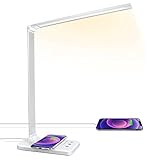
JOSTIC combines a lamp with a wireless charging pad and a USB port. The listing gives 10 brightness levels, 5 color modes and touch control, which is a broad range for the price tier.
Wireless charging only works if your phone supports it and sits in the right spot, and the listing text we have does not state the charging wattage. A base lamp also uses desk space. If you already have a charger, a clamp lamp may be a better use of that area.
Pros
- Wireless charger plus USB port
- 10 brightness levels and 5 color modes
- Touch control
Cons
- Charging wattage not shown in listing text
- Uses desk space
Which One Should You Pick
If you want one lamp that does a bit of everything, the Honeywell H01 Pro is the pick because its listing is the most complete. If your desk is wide, go for the MACASA. If space is tight, go for the Quntis light bar.
Choose the Pzloz or SIBRILLE if you want an architect arm and have a desk edge to clamp onto. Choose the JOSTIC if you want a phone charging pad built into the lamp. Whatever you pick, place the lamp opposite your writing hand so your hand does not cast a shadow over the page.
As a last check, confirm the lamp’s power source. Most lamps here use a wall adapter or USB, and a lamp that plugs into a USB port on a monitor or a hub is simpler to place than one that needs another outlet, especially on a desk against a wall with few sockets.
How to Choose Desk Lamps Under $50
Choose the mounting style
A base lamp is easiest to move, a clamp saves desk space, and a monitor light bar needs no desk area at all. Pick based on how much of your desk is free.
Look for CRI and color range
CRI of 95 or higher, as listed on the Honeywell, means colors look more natural under the lamp. A range of color temperatures lets you warm the light in the evening and cool it for daytime tasks.
Match brightness to your task
Reading and typing need less light than drawing or soldering. Many listings do not give lumens, so check the maker page, and choose a lamp with dimming so you can adjust.
Check charging and controls
If you want a phone charger on the lamp, the JOSTIC lists a wireless pad and the Honeywell lists A+C charging ports. Touch or remote controls are handy, but a simple dial is fewer parts to fail.
Desk Lamps for Home Office, Small Spaces and Gaming
Desk lamps for home office
A home office benefits from a lamp with a high CRI and a warm setting. The Honeywell H01 Pro is the best fit, and a clamp lamp keeps your desk free for paperwork.
Desk lamps for small spaces
If your desk is small, the Quntis light bar uses no surface area at all, and a clamp lamp can free the surface compared with a base lamp.
Desk lamps for gaming
Gaming setups look best with indirect light and less glare on the screens. A monitor light bar or a dual-head clamp lamp lights the keyboard without lighting the screen directly.
FAQ
What is the best desk lamp at this budget?
The Honeywell H01 Pro is the best all-round pick because its listing gives a CRI of 95 or higher, four color settings and USB charging. The MACASA is the better choice for wide desks.
Is a monitor light bar better than a desk lamp?
It uses no desk space and avoids screen glare, but lights a narrower area. A desk lamp lights a wider area and can be moved.
What does CRI mean on a desk lamp?
CRI measures how accurately a light shows colors. A value of 95 or higher means colors look natural. It matters more for design work than for typing.
Are clamp lamps safe for all desks?
They need a solid edge. Check the clamp thickness range on the maker page, and avoid glass or very thin desktops unless the listing says it fits.
Can a desk lamp charge my phone?
Some can. The JOSTIC lists a wireless pad and a USB port, and the Honeywell H01 Pro lists A+C charging ports. Check your phone’s charging support.
Last updated: November 2026
More from Amazon
Programs that pair well with the guide above. Offers and eligibility are set by Amazon and may change.
Collect the home and kitchen items you want in one registry that guests can shop from.
Create a wedding registrySet up recurring deliveries of everyday items on eligible products. Terms and savings are set by Amazon.
Explore Subscribe & SaveFree shipping on eligible items, Prime Video and more. Eligible new members can start with a free trial.
Start a Prime free trialAudiobooks and podcasts to listen to on the go. Eligible new members can start with a free trial.
Try Audible freeAs an Amazon Associate we earn from qualifying purchases.