Key takeaways
- Precision height adjustment across a full 5-inch range
- Sturdy construction reported to handle mid-tower weight without flexing
- At $45.58 it costs nearly three times the floor-lift alternatives
A tower that sits on the floor gathers dust and restricts airflow. A monitor at desk level forces a forward-leaning posture that tightens the neck and shoulders by mid-afternoon. Cables, pens, sticky notes, and peripheral boxes spread across the work surface until there is no room left to type. These are the everyday problems that drive people to search for a pc organizer, and they share a root cause: the workspace was never designed around the equipment that now dominates it.
What separates a worthwhile organizer from a cheap one is not the number of features listed on the box. It is whether the unit actually solves the specific spatial problem you have. A height-adjustable tower stand does nothing for cable management. A monitor riser with a drawer is pointless if the drawer is too shallow to hold anything larger than a paperclip. Below, we compare eight products using their published specifications and aggregated owner feedback to help you match a solution to your setup without guessing.
As an Amazon Associate we earn from qualifying purchases at no extra cost to you. Product prices and availability are accurate as of the date shown and are subject to change.




Quick Picks
| Product | Best for | Price |
|---|---|---|
| JANE EYRE Computer Tower Stand | Towers that need precise height alignment | $45.58 |
| Adjustable Computer Tower Stand (Black) | Budget airflow lift for a floor tower | $16.99 |
| gianotter Dual Monitor Stand Riser | Two-monitor setups needing pen and document storage | $26.99 |
| OPNICE 2-Tier Monitor Stand Riser | Laptop plus external monitor stacking | $19.79 |
| Spacrea Printer Stand with Storage | Printer and supply storage in one footprint | $16.99 |
| Vaydeer All-in-One Dual Monitor Riser | High-end dual-screen desks needing charging and ports | $179.99 |
| gianotter Monitor Stand with Drawer | Single-monitor desk with minimal clutter | $16.99 |
| OPNICE Monitor Stand Riser (Brown) | Warm-tone setups with printer and laptop combined | $19.99 |
How We Picked
We narrowed the field using four criteria: load capacity relative to price, adjustability range (height tiers, drawer depth, or port count), material durability reported by long-term owners, and whether the product solves one specific spatial problem well rather than many poorly. Products with recurring complaints about wobbling, stripped screws, or drawer mechanisms that jam under moderate weight were excluded regardless of listed specs. We also weighted whether the unit’s footprint wastes desk surface that could otherwise be used for typing or paperwork.
The 8 Best PC Organizer in 2026
JANE EYRE Computer Tower Stand
This is the only product on the list with an explicit height range—23.03 inches to 28.3 inches—making it the strongest pc organizer choice for anyone whose tower needs to sit flush with a standing desk or at a very specific ergonomic height. Owners highlight the telescoping mechanism as genuinely useful for aligning the tower top with a monitor base, which reduces cable length and keeps the floor path clear.
- Precision height adjustment across a full 5-inch range
- Sturdy construction reported to handle mid-tower weight without flexing
- At $45.58 it costs nearly three times the floor-lift alternatives
Skip it if your tower stays on the floor and you only need airflow elevation; a cheaper stand will do.
Adjustable Computer Tower Stand, Ventilated Mobile CPU Holder, Black
At $16.99 this is the cheapest functional tower elevation option here, and owners confirm the ventilation design does help reduce bottom-intake dust. The mobile casters let you slide the tower forward to access rear ports without lifting the whole unit, which is a genuine convenience for anyone with a desk against a wall.
- Low price point with no meaningful compromise on airflow elevation
- Casters provide easy rear-port access without tipping
- Plastic frame feels light and can wobble on uneven floors
Skip it if your tower exceeds mid-tower weight or you need it above 22 inches.
gianotter Dual Monitor Stand Riser With Drawer and 2 Pen Holders
This riser raises two monitors to eye level while tucking pens and small supplies into the built-in drawer and open slots. Owners with dual-screen layouts call it the most space-efficient pc organizer option at under $27, since the drawer sits beneath the monitor deck rather than protruding forward.
- Frees significant desk depth by elevating screens overhead
- Integrated drawer plus pen holders handle daily small-item clutter
- Not rated for large-format monitors over 27 inches on each side
Skip it if you run ultrawide single displays; the split-deck design may not align well.
OPNICE 2-Tier Monitor Stand Riser with Drawer and 2 Pen Holders
The two-tier layout lets you park a laptop on the upper shelf while an external monitor sits at the same level, creating a quick dual-screen arrangement without a second arm. At $19.79 it undercuts most dual-monitor risers while still including a drawer and pen holders, making it a practical budget pc organizer for hybrid laptop-and-monitor users.
- Tiered design suits laptop plus monitor workflows naturally
- Includes drawer and pen holders at an aggressive price
- Upper tier height may be too low for users over 6 feet
Skip it if your laptop already sits on a dedicated stand; the tier becomes wasted space.
Spacrea Printer Stand with Storage, Black
Printers are among the most spatially disruptive items on a desk, and this stand elevates one onto a dedicated platform with a lower storage shelf for paper and ink. Owners report it clears roughly a third of their usable surface area, making it a focused pc organizer solution for home offices that still print.
- Dedicated printer footprint eliminates a common desk hog
- Lower shelf keeps paper and toner within arm’s reach
- Limited height clearance for top-load printers with open lids
Skip it if you rarely print; a general riser offers more flexibility at similar cost.
Vaydeer All-in-One Dual Monitor Stand Riser
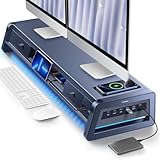
At $179.99 this 39.3-inch metal unit is in a different category from everything else here. It combines two drawers, eight USB ports, a wireless charging pad, and an LED light strip into a single pc organizer that replaces a charging dock, a hub, and a riser at once. Long-term owners praise the metal frame’s rigidity even at maximum monitor load.
- Eight USB ports plus wireless charging eliminate cable clutter at the source
- All-metal construction resists flex under dual 32-inch loads
- Price excludes it from most budget setups entirely
Skip it if you already have a hub and drawers; you are paying for integration you may not use.
gianotter Monitor Stand with Drawer and 2 Pen Holders
This is the single-monitor counterpart to the dual version above, priced at $16.99. It raises one display to eye level and tucks essentials into the under-deck drawer. Owners with compact desks call it the simplest effective pc organizer because it adds height and storage without requiring any assembly beyond a few screws.
- Minimal footprint preserves desk width for keyboard and mouse
- Under-$17 pricing makes it a low-risk upgrade from a stack of books
- Drawer is shallow—bulky items like staplers won’t fit
Skip it if you run two monitors or need deep storage.
OPNICE Computer Monitor Stand Riser, Brown
The warm brown finish distinguishes this unit from the black-dominated pc organizer market, and owners pairing it with wood-grain desks report it blends without the contrast that black risers create. It serves as both a monitor platform and a printer stand at $19.99, with a drawer for small supplies.
- Color option suits wooden or warm-tone furniture setups
- Dual function as monitor riser and printer stand saves buying two units
- Brown finish shows fingerprints and scuffs more readily than black
Skip it if you prefer a neutral or cool-tone desk aesthetic; black alternatives here are cheaper.
Buying Guide
Match the Organizer to Your Primary Bottleneck
The most common mistake is buying a monitor riser when the real problem is a tower on the floor collecting dust, or vice versa. Identify which item consumes the most unusable space or causes the most ergonomic strain, then buy a product that addresses that specific item. A $16.99 tower stand solves the floor problem better than a $26.99 monitor riser would.
Check Load Capacity and Material Before Price
A riser rated for 20 pounds cannot support a 34-inch monitor plus a laptop. Look for owner reports of sagging or cracking rather than relying on the listing’s maximum. Metal frames tolerate sustained weight better than plastic or engineered wood, but they add cost and sometimes require assembly.
Measure Your Desk Depth and Monitor Stand Width
A riser that is deeper than your desk leaves no room to type. Measure from the back edge of your desk to the front edge, subtract the depth of your monitor’s existing stand base, and use the remainder as your riser ceiling. The same principle applies to tower stands: confirm the base fits between desk legs or against a wall without blocking cable paths.
Our Verdict
The best overall pc organizer on this list is the Vaydeer All-in-One Dual Monitor Stand Riser. Its integration of storage, charging, and port expansion into one metal frame addresses the most common desk-clutter sources simultaneously, and the 39.3-inch width accommodates nearly any dual-monitor arrangement. For budgets under $20, the OPNICE 2-Tier Monitor Stand Riser delivers the most function per dollar, stacking a laptop and monitor while hiding supplies in a drawer. One condition changes the answer entirely: if your primary complaint is a tower sitting on a dirty floor, no monitor riser helps—buy the JANE EYRE Height Adjustable Tower Stand and align the machine to your desk edge instead.
FAQ
Do pc organizers actually help with cable management?
Only those with built-in ports or channel designs do. The Vaydeer riser’s eight USB ports let you route peripherals into the stand rather than trailing cables to the tower. A simple wooden riser with a drawer does nothing for cables.
How much desk space can I expect to recover?
Owners of dual-monitor risers typically report reclaiming the full footprint their monitors previously occupied—often 30 to 40 percent of surface area. The exact number depends on how much space your monitor stands consume, so measure before purchasing.
Is a metal frame worth the price difference over plastic?
For loads above 15 pounds or in humid environments where plastic can become brittle over years, metal is the safer long-term investment. For a single lightweight monitor under 22 inches, a well-rated plastic riser at $17 will serve for several years without issue.
Can one organizer handle both a tower and a monitor?
Not effectively. Tower stands lift the machine; monitor risers elevate the display. Their geometries and weight profiles differ too much for a single unit to do both jobs well. Pair a tower stand with a riser if both problems exist.