Key takeaways
- Compare rackmount UPS systems with LCD voltage displays for home labs and network racks, by VA and watt rating, rack height, depth and waveform.
The real decision with a rack UPS is not whether it has a battery, but whether the watts, the rack depth and the display tell you the truth about your load before an outage does. A unit that fits a shallow wall cabinet may leave a deep server chassis unprotected, and a screen that only shows a battery icon hides the voltage swings that wear equipment down. Buyers need the watt rating, the rack height in U, the chassis depth and a display that reports input and output voltage, load level and estimated runtime.
This guide is for home lab owners protecting a NAS and a small server, for households running a network rack with switches and routers, and for media racks where a recorder or streaming box must ride through a flicker. Every pick below is a true rackmount UPS with a real battery, chosen from the product names and specifications on its Amazon page, and every one has a front LCD that shows voltage and status information.
Quick Picks
As an Amazon Associate we earn from qualifying purchases
| Product | Best for | Key spec from title |
|---|---|---|
| CyberPower CP1500PFCRM2U PFC Sinewave UPS | Short-depth racks with active PFC gear | 1500VA/1000W, 8 outlets, short depth 2U rackmount |
| Tripp Lite SMART1500RM2U SmartPro UPS | Heavier server loads needing the most watts | 1500VA, 1350W, 8 outlets, 2U rackmount |
| CyberPower OR1500LCDRM1U Smart App LCD UPS | Racks with only 1U of free space | 1500VA/900W, 6 outlets, 1U rackmount |
| Tripp Lite SMC15002URM SmartPro UPS | Workgroup servers that need longer half-load runtime | 1500VA, 1000W, 8 outlets, 2U rackmount |
| CyberPower CP1000PFCRM1U PFC Sinewave UPS | Light network racks on a single rack unit | 1000VA/600W, 6 outlets, 1U rackmount |
How to Choose
Size by watts, not by the VA headline
Add up the actual watt draw of everything that will sit on the battery outlets, then compare that total with the watt rating, which is always the lower and more honest number. A switch, a router and a small NAS might total under 150 watts, while one mid-range server can pass 400 watts on its own. For example, a rack drawing 500 watts fits comfortably under a 900W or 1000W unit but would overload a 600W model even though its VA figure looks close. Leave headroom above your measured total, because batteries deliver less as they age and a unit run near its limit gives you almost no time to shut down cleanly.
Match rack height and depth to the cabinet
Rackmount UPS models come in 1U and 2U heights, and the depth difference matters as much as the height. A 2U unit such as the CyberPower CP1500PFCRM2U is only 10.5 inches deep, so it closes inside short wall-mount cabinets where a full-depth server UPS would block the rear door. A 1U model saves vertical space for another switch or patch panel, but check its depth too, because some 1U chassis still run past 15 inches. Measure the distance between the front rails and the cabinet door, allow room for power cords to bend, and confirm the mounting hardware suits a two-post or four-post rack before ordering.
Read what the display actually reports
The point of a voltage display is diagnosis, not decoration. The useful screens report input and output voltage, load as a percentage and in watts, battery capacity and estimated runtime remaining, and the Tripp Lite models in this guide list exactly those fields on their Amazon pages. A display that shows input voltage dropping every afternoon tells you the circuit sags under load, which is a wiring conversation, not a battery problem. Check whether the screen can rotate if you might stand the unit in a tower position later, and whether the panel is a colour LCD or a plainer multifunction screen, since both appear in this category.
Check the waveform against your power supplies
On battery, a UPS generates its own version of mains power. Pure or PFC sine wave output suits computers and servers with active PFC power supplies, which can behave badly on a simulated wave. The CyberPower PFC Sinewave models and both Tripp Lite picks here state sine wave output on their listings, while the CyberPower OR1500LCDRM1U states simulated sine wave output and is described for equipment without active PFC supplies. Read the requirement in your server or workstation manual first. If the manual calls for sine wave input, treat that as a hard filter and remove simulated-wave models from your shortlist, whatever their VA rating says.
The 5 Best Options
CyberPower CP1500PFCRM2U PFC Sinewave UPS

This is the pick for a short-depth rack that still needs proper sine wave backup. At 10.5 inches deep it suits wall-mount cabinets and shallow AV racks that cannot swallow a full-length chassis, yet it still carries a 1500VA and 1000W rating across eight outlets. The multifunction control panel uses a colour LCD to confirm status and alerts at a glance, and automatic voltage regulation corrects minor fluctuations without switching to battery power, sparing the battery on circuits that dip often. Security systems, audio and video equipment and networking gear needing active PFC compatibility are the uses its listing names, and remote management is available with an optional card.
Specs
- Capacity: 1500VA / 1000W
- Outlets: 8
- Form factor: 2U rackmount, 10.5 inches deep
- Dimensions: 10.5 x 17 x 3.4 inches
- Weight: 26.8 pounds
- Display: multifunction control panel with colour LCD
- Waveform: sine wave output on battery
- Features: automatic voltage regulation, EMI/RFI filtration, surge protection
Best for: Short-depth home lab and AV racks running active PFC equipment
Watch out for: Remote monitoring needs an optional card rather than being built in
ASIN: B0B354X985
Tripp Lite SMART1500RM2U SmartPro UPS

Choose this one when the rack holds a real server and the watt budget is the tightest constraint, because its 1350W rating is the highest in this guide. The front LCD monitors load level, voltage, battery charge and estimated runtimes, and the fuller screen data on its listing adds input and output voltage, load wattage, AVR status and daily power consumption. Automatic voltage regulation holds 120V nominal output across an input range of 83V to 147V without drawing on the battery. Eight outlets include four switchable ones, a network card slot supports standalone management, and the battery is hot-swappable, so a worn pack does not force a shutdown.
Specs
- Capacity: 1500VA / 1350W
- Outlets: 8 NEMA 5-15R, four switchable
- Input: NEMA 5-15P, 10-foot cord
- Runtime: 13 minutes at half load, 4.5 minutes at full load
- Display: front-panel LCD showing voltage, load, battery charge and runtime
- Waveform: pure sine wave output on battery
- Surge suppression: 570 joules
- Features: automatic voltage regulation, network card option, hot-swappable battery
Best for: A small server and storage stack that needs the most watts in 2U
Watch out for: The chassis is a full-depth 2U design, so measure cabinet depth first
ASIN: B0001AC2P0
CyberPower OR1500LCDRM1U Smart App LCD UPS
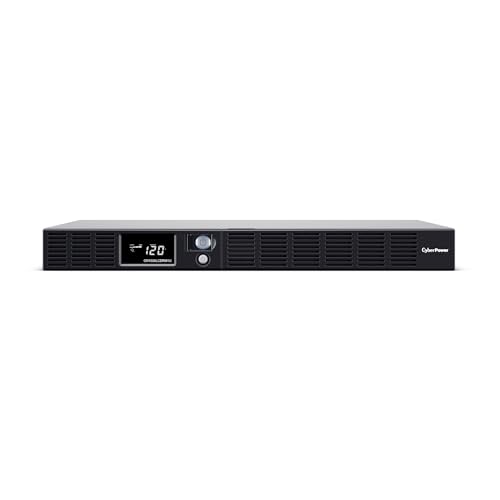
When only a single rack unit is free, this 1U model keeps a full 1500VA rating without giving up another slot. Its multifunction LCD panel is the centre of the design, and the listing frames it around department and workgroup servers, network devices and telecom installations. Six outlets split into four battery-backed and surge-protected outlets plus two surge-only outlets, so plan which devices truly need battery time and which only need surge cover. Automatic voltage regulation handles minor fluctuations without cycling the battery. Runtime is short at full load, so treat this as orderly-shutdown protection for a moderate rack rather than a way to ride out a long outage.
Specs
- Capacity: 1500VA / 900W
- Outlets: 6 total, 4 battery and surge protected, 2 surge only
- Form factor: 1U rackmount
- Dimensions: 19.5 x 17.25 x 1.75 inches
- Weight: 33 pounds
- Runtime: 11 minutes at half load, 2 minutes at full load
- Display: multifunction LCD panel
- Waveform: simulated sine wave output on battery
- Features: automatic voltage regulation, optional RMCARD205 network management card
Best for: Network and telecom racks with exactly 1U of space to spare
Watch out for: Simulated sine wave output is not intended for active PFC power supplies
ASIN: B0016P7HJA
Tripp Lite SMC15002URM SmartPro UPS
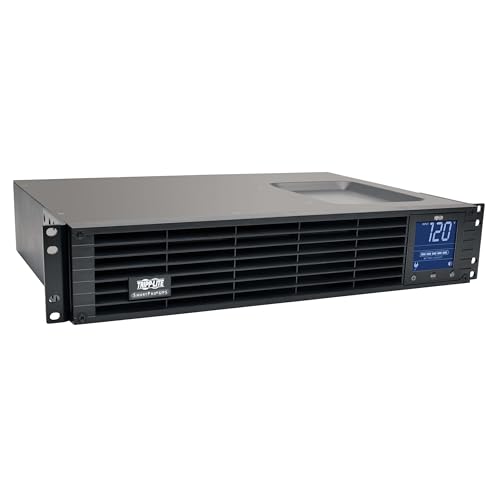
This 2U model suits a workgroup rack where the load sits near half capacity most of the day, because its listing rates it for up to 17.7 minutes at a 500W half load, the longest half-load figure here. The illuminated LCD reports input and output voltage, load percentage and wattage, battery status, AVR status and estimated runtime, and it can rotate if the unit is later stood in a tower position. Eight outlets, pure sine wave output and hot-swappable batteries cover the practical bases for workgroup servers, storage and switches, and management runs through the screen, a USB connection or the PowerAlert software on the listing.
Specs
- Capacity: 1500VA / 1000W
- Outlets: 8
- Form factor: 2U rackmount, rotatable LCD for tower use
- Dimensions: 13.45 x 17.3 x 3.45 inches
- Runtime: up to 17.7 minutes at half load (500W)
- Display: illuminated LCD showing input/output voltage, load and runtime
- Waveform: pure sine wave output on battery
- Surge protection rating: 570 joules
- Battery: lead acid, hot-swappable, 4.5-hour charge time
Best for: Workgroup servers and storage that idle near half load
Watch out for: Network-style remote management is more limited than on card-slot models
ASIN: B00VBIC5KI
CyberPower CP1000PFCRM1U PFC Sinewave UPS

A light network rack does not need 1500VA, and this 1U unit is sized for the switches, router, modem and recorder in home racks. Its 1000VA and 600W rating still comes with PFC sine wave output, so a small server or workstation with an active PFC supply is covered, and the multifunction panel with a colour LCD confirms status and alerts at a glance. Automatic voltage regulation corrects minor fluctuations without switching to battery, and the listing names security systems, audio and video equipment and networking equipment as its intended loads. At 15 inches deep it needs a deeper cabinet than the smallest shelves, so check depth first.
Specs
- Capacity: 1000VA / 600W
- Outlets: 6
- Form factor: 1U rackmount
- Dimensions: 15 x 17 x 2 inches
- Weight: 30.2 pounds
- Display: multifunction control panel with colour LCD
- Waveform: sine wave output on battery
- Features: automatic voltage regulation, EMI/RFI filtration, surge protection
Best for: A single-unit slot protecting switches, a router and a small NAS
Watch out for: The 600W ceiling is quickly reached if a full server joins the rack
ASIN: B0DCLJNLRD
Which One Fits Your Situation
A shallow wall-mount network cabinet
Pick the CyberPower CP1500PFCRM2U. Its 10.5-inch depth is the deciding fact in a cabinet where the door barely clears the switches, and the colour LCD still gives you voltage and status without opening a laptop. The 1000W rating covers a switch stack, router and NAS with room to spare, and sine wave output keeps a small active PFC server supply happy.
One free rack unit above the patch panel
Pick the CyberPower OR1500LCDRM1U if your gear uses conventional power supplies, since it puts 1500VA into a single rack unit. Put only the four devices that matter on its battery-backed outlets and use the two surge-only outlets for peripherals. If any load has an active PFC supply, step instead to the 1U CyberPower CP1000PFCRM1U and accept its lower 600W ceiling.
A home server that must shut down cleanly
Pick the Tripp Lite SMART1500RM2U. The 1350W rating gives a server and its storage the most headroom here, the LCD shows estimated runtime so you can judge whether the load is realistic, and the optional network card path supports managed shutdown setups. Its 13 minutes at half load is working time to save files and power down in order, not ride-out time.
A workgroup rack that runs all day near half load
Pick the Tripp Lite SMC15002URM. Its half-load runtime figure is the strongest in this guide, its screen reports load in both percentage and watts so you can watch the rack creep toward its limit over months, and hot-swappable batteries mean a replacement pack does not take the whole rack offline during a working day.
Common Mistakes
- Sizing by the VA number alone and ignoring the lower watt rating, which is the limit the UPS actually enforces under load.
- Ordering a full-depth 2U unit for a shallow wall cabinet, then finding the rear door will not close over the power cords.
- Plugging every device into the battery outlets, including surge-only loads such as printers, and cutting the runtime for the server that matters.
- Choosing a simulated sine wave model for a server whose manual requires sine wave input, then blaming the UPS when the supply drops out on battery.
- Never reading the display after installation, so a slow voltage sag or a battery that no longer holds charge goes unnoticed until the first real outage.
Frequently Asked Questions
What does the voltage display on a rack UPS actually tell me?
It reports the power coming in and going out, alongside load and battery information. On the Tripp Lite models here the screen lists input and output voltage, load percentage and wattage, battery capacity and estimated runtime. A repeated low input reading points to a sagging circuit, while a rising load percentage warns that the rack is outgrowing the unit.
How many watts do I need for a home network rack?
Total the nameplate or measured draw of each device on the battery outlets. A router, modem and one switch often stay well under 100 watts, a NAS adds a modest amount, and a small server is usually the largest single load. Match that total against the watt rating, not the VA figure, and leave clear headroom for battery ageing.
Is 1U or 2U better for a rack UPS?
Neither is better in general; the right choice is the one your rack can house. A 1U model preserves a slot for other equipment and suits network loads, while a 2U chassis can hold a larger battery and, in the short-depth CyberPower here, can even be the shallower option. Measure height, depth and door clearance together rather than choosing on height alone.
Can a rack UPS run my equipment through a long outage?
No, and it is not designed to. The runtimes on these listings are measured in minutes, from a couple of minutes at full load to under twenty minutes at half load on the longest-rated model here. The job of a rack UPS is to ride through flickers and give servers and storage time to save data and shut down safely, not to replace a generator.
More from Amazon
Programs that pair well with the guide above. Offers and eligibility are set by Amazon and may change.
Collect the home and kitchen items you want in one registry that guests can shop from.
Create a wedding registrySet up recurring deliveries of everyday items on eligible products. Terms and savings are set by Amazon.
Explore Subscribe & SaveFree shipping on eligible items, Prime Video and more. Eligible new members can start with a free trial.
Start a Prime free trialAudiobooks and podcasts to listen to on the go. Eligible new members can start with a free trial.
Try Audible freeAs an Amazon Associate we earn from qualifying purchases.