Key takeaways
- Desk placement. Leave a few inches at the rear and front for airflow. Do not put the case in a closed cabinet.
- Dust. Mesh fronts have dust filters; plan to clean them every month or two.
- Weight. Glass panels add weight. Take care lifting with the panel on, and note the panels are fragile.
- Noise. More fans at low speed are quieter than fewer fans at high speed. Many motherboards allow fan curves.
- Safety. Unplug the PC before opening it, ground yourself, and use a power outlet with surge protection.
For most builders, the NZXT H5 Flow RGB, the Lian Li Lancool 216 and the Fractal Design Pop Air RGB are the mid-tower ATX cases to start with: each has a tempered-glass or windowed side and a stock fan set with lighting, and they differ mainly in airflow, fan count and how easy the build is. Buyers on a tight budget should look at Montech and Corsair airflow models, while those who want a showpiece should look at dual-chamber or panoramic-glass designs. This guide explains how to read case specifications and match a case to a home desk or living-room setup.
Our top picks



As an Amazon Associate we earn from qualifying purchases at no extra cost to you.
What the search terms mean
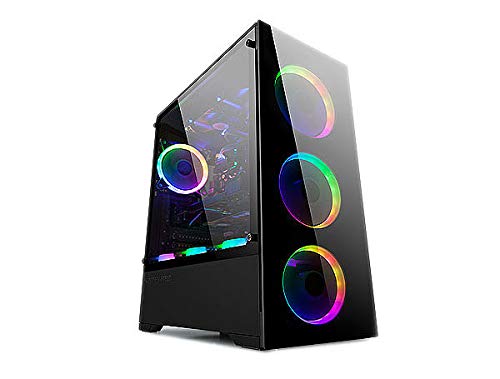
A mid-tower ATX case holds a full-size ATX motherboard (and smaller sizes such as micro-ATX and mini-ITX). A window panel, usually tempered glass, shows the inside. RGB fans are fans with addressable lights, often ARGB, which the motherboard or a controller can set to colors and patterns. Many cases ship with fans pre-installed; others ship with none, so the stock fan description is the key spec.
At a glance
| Case family | Best for | Key points (as the makers describe them) | Limits |
|---|---|---|---|
| NZXT H5 Flow RGB | Simple, clean builds with strong front airflow | Mid-tower ATX, perforated front panel, tempered-glass side, pre-installed fans with RGB on the RGB version | Fewer drive bays; cable room is modest |
| Lian Li Lancool 216 (RGB version) | Airflow-first builds | Large front fans, mesh front, tempered-glass side, support for large coolers and long graphics cards, per the maker | Larger footprint; check the exact version for the lighting package |
| Fractal Design Pop Air RGB | Value builders who want a mesh front | Mid-tower ATX, perforated front, tinted glass or clear window variants, pre-installed ARGB fans | Fewer features than premium cases |
| Corsair 4000D Airflow / iCUE 4000D RGB Airflow | Builders who value easy cable management | Mid-tower ATX, tempered-glass side, mesh front; RGB variants include lit fans | Not all versions include RGB; check the model code |
| Montech Air 903 Max | Budget builds that want a lot of fans | Mid-tower, mesh front, tempered glass, multiple pre-installed ARGB fans, per the maker | Build quality and finish are budget-tier |
| Dual-chamber or panoramic cases (Hyte, Lian Li O11 families) | Show builds with water cooling | Two-panel glass views, room for radiators | Larger, more expensive, airflow can be lower with solid glass |
Models are updated often and variants (white, black, with or without RGB fans) share the same name. Read the box and the maker’s page for the exact stock fans.
Airflow versus looks
A solid glass front looks sleek but can restrict airflow. A mesh or perforated front lets the fans pull more air. Reviewers commonly advise that gaming systems with a high-power graphics card benefit from a mesh front. If you want a glass look, make sure the maker provides side or top vents and that the stock fan count is sufficient.
Fan configuration matters. A common good layout is two or three front intake fans, one rear exhaust and one or two top exhaust fans, with the glass side panel closed. If a case ships with only one or two fans, factor in the cost of adding more.
Fit and compatibility
Motherboard
Mid-tower cases support ATX, micro-ATX and mini-ITX. E-ATX support is rarer in this class.
Graphics card length and thickness
Makers list the maximum GPU length in millimeters. Many modern cards are long and thick, so match the figure to your card and allow room for a front radiator if you plan one.
CPU cooler height and radiator support
Air cooler height limits are listed in millimeters. Radiator support is listed for front, top and rear positions; check both the radiator size and thickness.
Power supply and cable space
Standard ATX power supplies fit most mid-towers. A shroud hides the cables. Cable management space behind the motherboard tray affects how neat the build looks through the window.
RGB connectors
Addressable RGB fans use a three-pin 5V connector, and some use proprietary hubs. Check that your motherboard has a header or that the case includes a controller. Do not connect a 5V ARGB connector to a 12V RGB header, as that can damage the lights.
Home setup notes
- Desk placement. Leave a few inches at the rear and front for airflow. Do not put the case in a closed cabinet.
- Dust. Mesh fronts have dust filters; plan to clean them every month or two.
- Weight. Glass panels add weight. Take care lifting with the panel on, and note the panels are fragile.
- Noise. More fans at low speed are quieter than fewer fans at high speed. Many motherboards allow fan curves.
- Safety. Unplug the PC before opening it, ground yourself, and use a power outlet with surge protection.
Budget tiers
| Tier | What to expect | Trade-off |
|---|---|---|
| Budget | Montech Air 903 Max, Fractal Pop Air RGB | Thinner panels, fewer extras |
| Mid-range | NZXT H5 Flow RGB, Corsair 4000D Airflow RGB, Lancool 216 | Better build and cable space |
| Premium | Hyte or Lian Li dual-chamber cases | Looks and water-cooling room, with higher cost and size |
Pick X if…
| If you… | Pick |
|---|---|
| Want the simplest first build with a clean look | NZXT H5 Flow RGB |
| Prioritize airflow for a hot graphics card | Lian Li Lancool 216 |
| Want a budget mesh-front case with lighting | Fractal Pop Air RGB or Montech Air 903 Max |
| Want easy cable management | Corsair 4000D Airflow family |
| Plan a custom water loop and a showpiece | A dual-chamber Hyte or Lian Li case |
Alternatives
- Micro-ATX or mini-ITX cases. Smaller, with fewer expansion slots; great for tight desks.
- Cases without RGB fans. Buy a lit fan pack later and save money if you want to choose the lighting.
- Full-tower cases. More room for large radiators and extra drives, at the cost of footprint.
Building tips for a clean window view
Because the side panel is clear, cable routing is part of the look. Use the tie-down points behind the motherboard tray, run the main power and graphics card cables in straight lines and keep spare connectors tucked away. Cases with a power-supply shroud help hide the lower cables. If the case includes a vertical GPU mount option, make sure the card and any riser cable are rated for it.
Fan direction and lighting
Fans have an intake and an exhaust side, usually marked by arrows on the frame. Front fans normally pull air in and rear and top fans push it out. Lit fans also have a front and back face for the lighting, so look at the maker’s diagram before screwing them in. If you daisy-chain several ARGB fans, plug them into a single header or the included hub rather than overloading one connector. Software lets you set a static color or an animation, and many boards allow a simple off switch for the lights if you find them distracting in a bedroom or living room.
Dust and upkeep
Slide out the dust filters and rinse or wipe them every month or two, depending on the room. Blow dust from the fans and heatsinks with short bursts of compressed air while holding the fan blades still. Keep the case off carpet if you can, because a hard surface or a small riser reduces dust drawn in through the bottom intake.
Warranty and parts
Makers list warranty periods on their pages. Keep the original screws and accessories, because some cases use special fan screws and panel thumbscrews. Replacement glass panels and fans are sold by several makers, which matters if a panel is chipped.
Choosing between white and black finishes
Most of the families above come in black and white. A white case with a glass panel shows off light-colored components and matching fans, but it shows dust and smudges more readily. Black cases hide dust and suit most graphics cards. Check that the white version has the same fan and filter package as the black one, because makers occasionally ship different stock configurations under similar names. Also confirm whether the glass is clear or tinted, since a dark tint softens the lighting and hides cable clutter but dims the view of the components.
Frequently Asked Questions
Do I need RGB fans?
No. They are cosmetic. Airflow depends on fan size, speed and the case design, not the lights. Choose them if you like the look and your motherboard supports the connector.
Is tempered glass safe?
Makers use tempered glass because it is stronger than ordinary glass and breaks into small pieces. Still, handle the panel carefully, avoid dropping it and keep it away from pets and small children.
How many fans should a mid-tower have?
Many gaming builds use three front, one rear and one or two top fans. That arrangement keeps air flowing through the case. Check the maker’s list of stock fans and plan for extras if needed.
Will my graphics card fit?
Compare the card length and thickness to the maker’s maximum GPU clearance, and allow room for a front radiator if you plan one. Measure from the rear bracket to the end of the card.
Why are my RGB fans not lighting up?
The most common cause is a loose connector or a mismatch between the fan’s header type and the motherboard header. Check the manual, and use the case’s controller if one is included.
Can I use a case with a solid glass front for gaming?
Yes, but airflow may be lower, so you may need more fans or lower component power. If you run a high-power graphics card, a mesh-front design is the safer choice.